Showing posts with label Education. Show all posts

Podcasts with gPodder


    gPodder downloads free audio and video content (podcasts) for you Listen directly on your computer or on your mobile devices. If you have an android device you can follow my guide at Android Relish on Podax Podcasting & gPodder. In the guide it mentions the gPodder.net service and Podcast Directory, the desktop and mobile version can both be synced with the free gPodder.net service. The website has been unreachable once but aside from that there isn't a better place to discover and manage good podcasts.


 gPodder is available for Linux, FreeBSD, Windows, Mac OS X and mobile devices like the Nokia N810, N900 and N9. Some of the highlights are that it has support for RSS, Atom, YouTube, Soundcloud, Vimeo and XSPF feeds, as well as exporting to OPML which can then be imported on an Android device. Easily synchronize between devices with full gpodder.net API support. gPodder is also easy customization with its' choice of supporting Python as it's extension language.

Homepagehttp://gpodder.org/
Downloadhttp://gpodder.org/downloads
Documentationhttp://gpodder.org/documentation
Source Codehttp://gpodder.org/wiki/Git
Wikihttp://wiki.gpodder.org/

Tutorial for using the gPodder.net for syncing multiple devices.

Android Relish - Podax Podcasts & gPodder

Mozilla Launches Popcorn Maker


    Popcorn Maker is an HTML5 web app for combining web media with images, text, maps, and other dynamic web content. Its appearance is unique, but not unfamiliar, providing a timeline-based video editing experience for the web. Once created, Popcorn Maker hosts remixes as simple HTML pages in the cloud, which can be shared or embedded in blogs or other sites. Furthermore, every remix provides a “Remix” button, allowing anyone watching to become a creator themselves by using the current remix as a base project for their own creation. This “view source” experience for web media is a key aspect of Popcorn Maker’s goals as part of the larger Mozilla Webmaker project.

    On a technical level, Popcorn Maker is the combination of a number of separate projects, each heavily influenced by the “12 factor” philosophy: a node.js-based web service called Cornfield; a JavaScript framework for creating highly-interactive web apps; and Popcorn.js, with a set of custom Popcorn.js plugins.


Watch one of the creators of Popcorn Maker explain the project


See an example in action


Make something with Popcorn Maker today: Popcorn Maker

More info about the code and development team and process

Repositories
https://github.com/mozilla/butter
https://github.com/mozilla/popcorn-js
Bug Tracker
https://webmademovies.lighthouseapp.com/projects/65733-butter/overview

FlightGear a Flight Simulator


    Founded in 1997, FlightGear is developed by a worldwide group of volunteers, brought together by a shared ambition to create the most realistic flight simulator possible that is free to use, modify and distribute. FlightGear is used all over the world by desktop flight simulator enthusiasts, for University research and education, for a variety of aerospace engineering and visualization work in industry, and even for interactive exhibits in museums.


    FlightGear features more than 400 aircraft, a worldwide seamless scenery database, a multi-player environment, detailed sky modelling, a flexible and open aircraft modelling system, varied networking options, multiple display support, a powerful scripting language, and an open architecture. Best of all, being open-source, the simulator is owned by the community and everyone is encouraged to contribute.


    Have heard that with the right equipment playing the FlightGear simulator could be used as pilot hours towards a pilots license. The features available in this open source project are amazing, not to mention just the scenerey would fill more then 3 DVDs. Check out the feature list at http://www.flightgear.org/about/features/

Start downloading FlightGear for free on Windows, Mac, & Linux from http://www.flightgear.org

Watch FlightGear in action


Mixxx - DJ Software Review


    Mixxx has everything you need to start making DJ mixes in a tight, integrated package. Whether you're DJing your next house party, spinning at a club, or broadcasting as a radio DJ, Mixxx has what you need to do it right.

    Best of all it's Open Source, free and available for Windows, Mac, and Linux!

Here is a quick 5 minute review of Mixxx by InfinityGalatic (who's been doing Linux App reviews on youtube). He is using the Ubuntu Linux Operating System which is also free and Open Source.


Links:
Download: Mixxx DJ Software http://www.mixxx.org
Download: Ubuntu Linux http://www.ubuntu.com

The Internet Archive Offers Over 1 Million Torrents

    The Internet Archive has seeded over 1,000,000 torrents of creative commons and public domain media, as well as complete websites

    The Internet Archive is a non-profit digital library with the stated mission of "universal access to all knowledge". The Internet Archive permanent handles the storage of and free public access to collections of digitized materials, including websites, music, moving images, and nearly 3 million public-domain books. The only problem is that it costs so much to share that infomation with direct downloads, torrents are the perfect way to share this legal content.

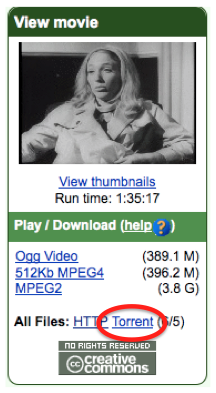
    Torrent is a protocol for computers to communicate and share files in such a way that as a user downloads a file they share it as well. When a user has the full download they can choose to seed the torrent longer or remove it from the torrent application while keeping the downloaded data. A single torrent file can have hundreds of files in it, and users can choose to download certain files or the whole torrent.

     A torrent file only works with a torrent downloading program. The Opera web browser can handle torrent files and I'd recommend using Opera, it has allot of good features and is secure. If your running a Linux operating system there is most likely a torrent application installed by default. For windows users the best torrent programs are Azureus which is open source and hosted by sourceforge.net it is also a torrent browser and media player. Utorrent also has torrent browsing capabilities but is more lightweight.

Internet Archive blog post - 1000000-torrents-of-downloadable-books-music-and-movies
Internet Archive - Torrent Hotlist
Internet Archive - Torrents Over a Million Books

Django/Rails-Like Rapid Development for Ubuntu


Glade + Python is about as easy as it gets for doing Linux GUI development.

With Glade you build a XML-file describing a Gnome graphical user interface using a GUI editor.
http://glade.gnome.org/

    The boiler plate code for a Python GTK project would be some stuff like importing the libraries you need, loading the Glade XML file, creating the initial class for your application and then starting up the gtk.main()-style mainloop.

    Once that is done then it's mearly a matter of defining class methods and assigning them to your various buttons.

    This tool works perfect for the novice programmer just about anyone should be able to get from zero to 'hello world' GUI program in about 2 minutes. With full version control, build environment, and the ability to easily create installable packages.

    From there on everyhing from accessing the hdd, remote file systems, dbus for system events, gstreamer transcoding/encoding/decoding, telepathy for integration into online services, and all that happy stuff is just a few edits away.


Installation

$ sudo apt-get install quickly quickly-ubuntu-template

Begin Tutorial

$ quickly tutorial ubuntu-application

Resources

https://wiki.ubuntu.com/Quickly
http://developer.ubuntu.com/resources/tools/quickly/
http://blog.didrocks.fr/post/Quickly-0.4-available-in-lucid!

New To Programming? Learn Python, which is a good choice for learning programming.
http://www.learnpython.org/
http://docs.python.org/tutorial/
http://code.google.com/edu/languages/google-python-class/

Old articles about Quickly
arstechnica.com - quickly-new-rails-like-rapid-development-tools-for-ubuntu -2010
zdnet.com - unchaining-the-opportunistic-programmer - 2009

Cyclos On-Line Banking System

    With the recent crash of the economy in Greece the people have come up with a new cashless Euro-free currency.  Rawstory: Greece develops cashless, Euro-free currency in tight economy

They were able to do this with the help of Open Source Software by a group called STRO (Social TRade Organisations). STRO’s objective is to move money as a major steering mechanism in society from causing environmental abuse and preventing many poor to optimise their capacities, to become an instrument that serves a qualitative human development. The first STRO was founded in 1970 in Holland.


STRO picks up the challenge described by Bank of England’s governor Mervyn King:
“Is it possible that advances in technology will mean that (...) the world may come to resemble a pure exchange economy? Electronic transactions in real time hold out that possibility. There is no reason, in principle, why final settlements could not be carried out by the private sector without the need for clearing through the central bank. (...) There is no conceptual obstacle to the idea that two individuals engaged in a transaction could settle by a transfer of wealth from one electronic account to another in real time. (...) The same system could match demands and supplies of financial assets, determine prices and make settlements. Financial assets and real goods and services would be priced in terms of a unit of account. Final settlement could be made without any recourse to the central bank.(...) Without such a role in settlements, central banks, in their present form, would no longer exist; nor would money.”


http://www.activistpost.com/2012/04/greek-town-develops-bartering-system.html

Visit http://project.cyclos.org/ to check out all the features of this Open Source project.

ChronoZoom


    More and more open source projects are sprouting into existence, and they are not just software projects they are hardware and educational resources as well. The ChronoZoom project is an HTML5 piece of software but is more then that, it is a new way to browse, learn and contribute to a wealth of knowledge. Even though it runs o the Azure platform this looks like a cool project, hope it gains momentum quickly.

ars technica - ChronoZoom takes you through 14 billion years of space-time

Click this link to open chronozoom, at the top left corner there is a film-strip icon, click it to show the introduction tab and select with or without audio
http://www.chronozoomproject.org/  - if the link doesn't work in Internet Explorer (your version is out of date), it will work in google Chrome, as well as Firefox 10.x and up.
The code is hosted on codeplex @ http://chronozoom.codeplex.com/


    The project is described as "an open source community project dedicated to visualizing the history of everything to bridge the gap between the humanities and sciences using the story of Big History to easily understand all this information."

    "With ChronoZoom," Saekow told Ars, "you can browse history, rather than digging it out piece by piece. Also, today with [fewer and fewer] students visiting the library, the serendipity of browsing for a book and finding another is something we hope ChronoZoom can restore. If you don't know what to search for, it's almost like that topic never existed."
Now comes the time in the project's development where open source comes into its own.
    "We envision a world where scientists, researchers, students, and teachers collaborate through ChronoZoom to share information via data, tours, and insight," the ChronoZoom team writes. "Imagine a world where the leading academics publish their findings to the world in a manner that can easily be accessed and compared to other data. We will be focusing on community development of features, capabilities, and content."