Showing posts with label Tool. Show all posts

Podcasts with gPodder


    gPodder downloads free audio and video content (podcasts) for you Listen directly on your computer or on your mobile devices. If you have an android device you can follow my guide at Android Relish on Podax Podcasting & gPodder. In the guide it mentions the gPodder.net service and Podcast Directory, the desktop and mobile version can both be synced with the free gPodder.net service. The website has been unreachable once but aside from that there isn't a better place to discover and manage good podcasts.


 gPodder is available for Linux, FreeBSD, Windows, Mac OS X and mobile devices like the Nokia N810, N900 and N9. Some of the highlights are that it has support for RSS, Atom, YouTube, Soundcloud, Vimeo and XSPF feeds, as well as exporting to OPML which can then be imported on an Android device. Easily synchronize between devices with full gpodder.net API support. gPodder is also easy customization with its' choice of supporting Python as it's extension language.

Homepage: http://gpodder.org/
Download: http://gpodder.org/downloads
Documentation: http://gpodder.org/documentation
Source Code: http://gpodder.org/wiki/Git
Wiki: http://wiki.gpodder.org/

Tutorial for using the gPodder.net for syncing multiple devices.
Android Relish - Podax Podcasts & gPodder

OpenEMR - Electronic Medical Records

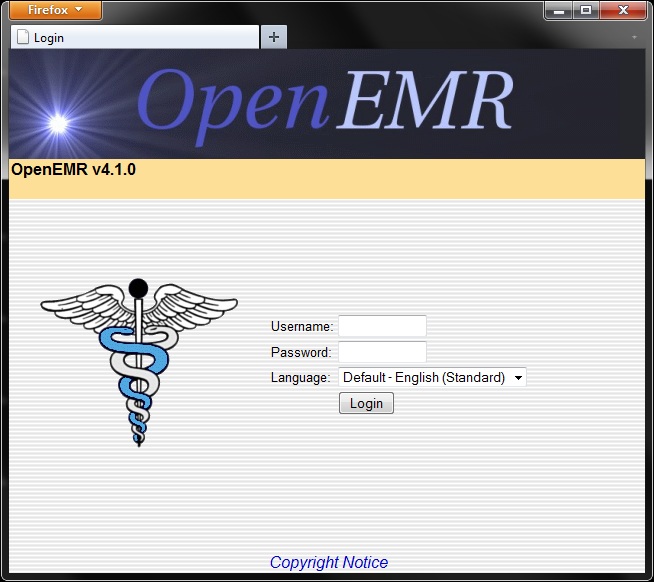
    Recently came across this software used to keep hospital records while browsing a site called BigThink. It is called Open-EMR (Electronic Medical Records), a 10 year old project with ~500,000 lines of code, became one of the first PHP projects to become a government certified EHR. OpenEMR is an ONC-ATB Ambulatory EHR 2011-2012 certified electronic health records and medical practice management application. It is written in php and runs on LAMP systems, most of the developers are Linux enthusiasts but the user base for the software is mainly Windows machines.


The website for the application http://www.open-emr.org/
The non-profit organization for the application http://www.oemr.org/
List of OpenEMR's features http://www.open-emr.org/wiki/index.php/OpenEMR_Features
Online demo of the software http://www.open-emr.org/wiki/index.php/OpenEMR_Version_4.1.0_Demo
A presentation about Open-EMR http://www.openaffairs.tv/2011/06/open-emr-presentation-and-discussion-at-portland-linux-user-group/
Download the application and or the source code http://www.open-emr.org/wiki/index.php/OpenEMR_Downloads


Cyclos On-Line Banking System

    With the recent crash of the economy in Greece the people have come up with a new cashless Euro-free currency.  Rawstory: Greece develops cashless, Euro-free currency in tight economy

They were able to do this with the help of Open Source Software by a group called STRO (Social TRade Organisations). STRO’s objective is to move money as a major steering mechanism in society from causing environmental abuse and preventing many poor to optimise their capacities, to become an instrument that serves a qualitative human development. The first STRO was founded in 1970 in Holland.


STRO picks up the challenge described by Bank of England’s governor Mervyn King:
“Is it possible that advances in technology will mean that (...) the world may come to resemble a pure exchange economy? Electronic transactions in real time hold out that possibility. There is no reason, in principle, why final settlements could not be carried out by the private sector without the need for clearing through the central bank. (...) There is no conceptual obstacle to the idea that two individuals engaged in a transaction could settle by a transfer of wealth from one electronic account to another in real time. (...) The same system could match demands and supplies of financial assets, determine prices and make settlements. Financial assets and real goods and services would be priced in terms of a unit of account. Final settlement could be made without any recourse to the central bank.(...) Without such a role in settlements, central banks, in their present form, would no longer exist; nor would money.”


http://www.activistpost.com/2012/04/greek-town-develops-bartering-system.html

Visit http://project.cyclos.org/ to check out all the features of this Open Source project.

Android - Daily Money

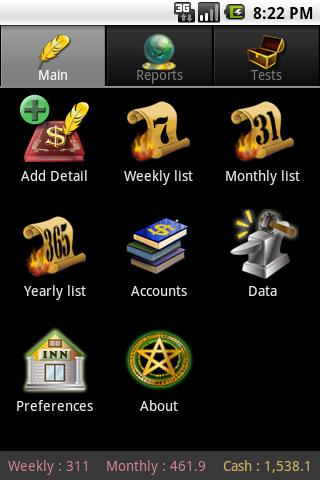
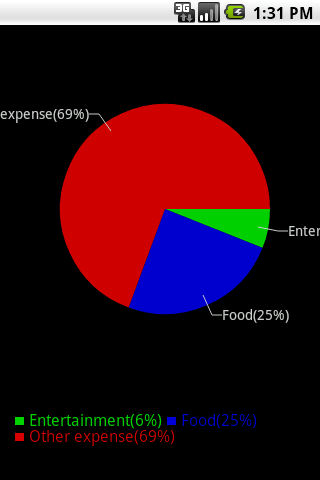
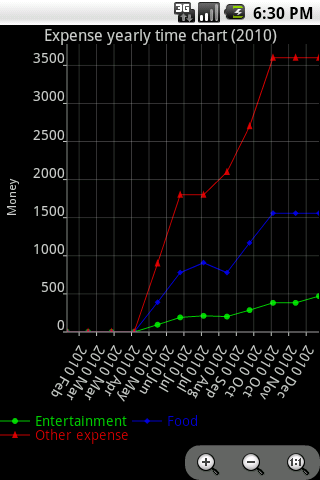
    There is a great open source money managing program for Android devices called Daily Money. With Daily Money you can balance multiple books and currencies as well as view pie charts and time charts, and of course, import and export existing records from other software.

    Daily Money has a lot of good options like being able to choose the folder the program saves its' info to, and being able to changing the default layout.


To make a long story short Daily Money is easy, useful, able to be customized and consistent.

Find it on the google market @
https://play.google.com/store/apps/details?id=com.bottleworks.dailymoney
and developers can get the code @ http://code.google.com/p/daily-money/

    If your a Linux user and running the KDE desktop, checkout Scrooge. Scrooge can be installed as a module from KDE Extragear, or through most distributions package manager. Skrooge is a personal finances manager for KDE4, aiming at being simple and intuitive, worth checking out.

Digital Makeup with Blender

    Can we afford some actual makeup artists, who will turn our actors into some jaw dropping visual effects characters who are covered with gore, blood, bolts, cables, jelly or whatever is required?
Or can we do that all digitally?

     The basic idea for digtal makeup is easy, as long as you do not think about it too long. Just have a digital double, track the head, body, limbs or whatever, apply the textures, props or clothes to that digital version of your actor and composite it over the actual footage of your actor. Here’s an example from Sebastian König:

Digital Makeup in Blender from Sebastian König on Vimeo.


Second Face Deform Test from Sebastian König on Vimeo.


     As seen in the example Sebastian used object markers for tracking various points on his face, but doing it this way can lead to problems with tracking when a character makes turns a certain way, or has hair in there face, or even a fast movement could mess up the tracking. There will soon be another method added for tracking that will address this issue. We don’t have a kind of tracking called planar tracking yet, but our awesome libmv developer Keir Mierle has something in the pipeline called “affine tracking”, which might help in this case. So with some luck we can do digital makeup without object-tracking.

Intro to New Blender Features

    The release of Blender 2.61 is a pretty big milestone with some really impressive new features that will likely draw in a torrent of new users. The feature that long time blender users are most appreciative for would have to be the new Cycles render engine. The feature that will most likely draw new users would have to be the motion tracking, which let's users put 3d objects in movies.

Cycles Render Engine
     Before Blender 2.61 when rendering a 3d scene that was indoors or most scenes for that matter, the render lacked certain light elements that left the scene looking blan and not real. With the Cycles render engine the lighting is handled completely differently and it shows as the renders are allot more realistic. Another feature of cycles is that it features OpenCL and will use graphics cards for rendering where possible.


In this tutorial from Andrew Price of Blender Guru you will discover:

  • The difference between the internal renderer and Cycles
  • Some of the cool features of Cycles
  • How to create your very first Cycles render
  • Using lights, materials, textures and bump mapping
  • How he made the donut scene


Motion Tracking
    Blender as a video editor is a pretty powerful tool, and with the new motion tracking features things just got serious. Mixing people into 3d scenes had been doable for a long while now, but with motion tracking we can now put 3d objects into movies.

A small 10 second example


A quick run through of setting up motion tracking. In this video the ground has already been mapped and the object is getting mapped.


    The other new features for blender 2.61 include ocean simulation, dynamic paint, camera sensor size and presets, 3D mouse color wheel editing, and more translations to other languages. New Addons in this release are an Adobe After Effects exporter, an Acclaim and C3D motion capture importers. Not to mention the 108 bug fixes and improved methods for new developers to make addons.

Blender is a free and Open Source Software get it at www.blender.org/get-blender/
Release notes for Blender 2.61 http://www.blender.org/development/release-logs/blender-261/
Demo files to that open in Blender's to try the new features  http://www.blender.org/development/release-logs/blender-261/blender-261-demo-files/

jME3 and Android Java 3D Game Development

    The open source community is always providing an amazing array of useful software. It also has great set of tools to work with. I'll introduce you to a combination of a couple tools that I'm using for 3d game development.

    jMonkeyEngine (jME) is a game engine made especially for modern 3D development, as it uses shader technology extensively. jMonkeyEngine is written purely in Java and uses LWJGL as its default renderer.OpenGL 2 through OpenGL 4 is fully supported.

    jMonkeyEngine is a community-centric open source project released under the new BSD license. It is used by several commercial game studios and educational institutions. The default jMonkeyEngine 3 download comes readily integrated with an advanced SDK that makes it more like a studio.
    By itself, jMonkeyEngine is a collection of libraries, making it a low-level game development tool. Coupled with an IDE like the official jMonkeyEngine 3 SDK it becomes a higher level game development environment with multiple graphical components.

Here is a Demo reel of jME from early 2011


    Using Blender3d you can save models with textures, animations, particles and more as a blend file then open them in the jME3 SDK and drop them into your game. On top of all that jME3 will compile to an android install package, if you point it to the android sdk. 

    Another piece of free and open source software in jME3 is the Nifty GUI. Below is a video demonstration of some of Nifty GUI's features. More on jME3 to come soon.


    One thing is for sure, it wouldn't be 3d with out Blender. Blender is a free and open-source 3D computer graphics software product used for creating animated films, visual effects, interactive 3D applications or video games. Blender's features include 3D modeling, UV unwrapping, texturing, rigging and skinning, fluid and smoke simulation, particle simulation, animating, rendering, video editing and compositing.

Here is a Demo reel of Blender made in 2011


    Blender has so many features it is more like a studio of software it's just amazing what it can do. Being Open Source and free there is a huge community of users helping noobs! Such as Andrew Price's website www.blenderguru.com where there are many in depth tutorials on using blender, plus a file that you can open in Blender and compare yours with his. There is also place to download free models such as www.blendswap.com and with creative commons licenses they can be reused and built upon.

    Blender has a physics engine and tools in place to create games without knowing any programming, which is awesome but for programmers to simple. That's where jMonkey Platform comes in.

Check out the links, get the software and have fun creat!

Linux Mint LXDE on Netbook Follow-Up

    Have been using Linux Mint LXDE on a Acer aspire one netbook with a half a gig of RAM, and it has been pleasant. Most of the time am running chromium and firefox with around 10 tabs open amongst them, and the little netbook keeps pushing with out any major slowdowns. It's quite responsive actually.

    Lately though have been doing java development on the netbook. Have installed eclipse and the android SDK, eclipse is versatile enough to be usable on the small screen of the netbook with out having a negative effect on the workflow. Of course using the android emulator could be an issue, one which I choose to avoid by just testing on a real android device.

    What really makes using the netbook for my development purposes possible, is libGDX. libGDX is a cross-platform library that allows you to simultaneously build for the desktop and for Android devices. With libGDX I can be doing little tests while at the desk and then do more in depth tests on the couch or in bed with an android device.

 Here is a video of a libGDX demo game


and here is the creator of libGDX showing a demo of the UI library


To get started developing with libGDX watch the video below to see how.


    Thanks for reading, and look forward to more details about libGDX as I get more into it and a detailed post about another java game engine called JMonkey.

Linux Mint on Netbook

    Was searching for the best Linux OS for a netbook (acer aspire one). Only have 512MB of RAM, so needed something lightweight yet still functional as a desktop. Tried Ubuntu 11, it worked fine, and was nice on the netbook, but was a little sluggish. I know there is specific OSes for netbooks like Jolicloud, and meego, but am going for a more traditional desktop, Linux Mint has been a good distro for me in the past, and is gaining in popularity do to people not liking the Unity user interface, and being based off of Ubuntu.


    Have installed and been using Linux Mint LXDE, and it is running smoothly, with all accessories working with no hassle. The "LXDE" is a desktop GUI, that will remind users of using the old Gnome, and is aimed for systems with low resources(ie...netbooks). While there is some differences it is straight forward and any linux user should feel comfortable using it.


The System requirements for Linux Mint LXDE:
  • x86 processor - runs on Intel Atom (netbooks)
  • 256 MB RAM
  • 3 GB of disk space
  • Graphics card capable of 800×600 resolution
  • CD/DVD drive or USB port


    Currently just use the system to work on web development and keep up with the news. Use the Chromium and Firefox web browsers for pretty much everything, and have about twenty tabs open among the two and still have some free RAM, amazing!

    The Linux Mint team are currently working on version 12 of Linux Mint. Allot of users don't like Ubuntu's Unity UI, and others don't like Gnome 3. While there is still the option of KDE, which is great GUI and compilation of software, it is not for everyone. So for Linux Mint 12 they are taking Gnome 3 and making it more like Gnome 2, am excited to see how it turns out.

Web Development Tools

    Been doing allot of web development lately and would like to write about the free tools that I have been using. This article is written from a programmers prospective cover tools and methods used for designing. There is one major advantage to this over WSIWYG editors, and that is cleaner code is achievable leading to a faster web application.

    Actually have been working with ASP.NET MVC and Silverlight. They are a very powerful tool set, Silverlight is a Microsoft replacement for  Adobe's Flash Player. They have there own WYSIWYG editor that also doubles as the GUI designer for Windows 7 Phones. Again is a really great tool set for someone for a programmer, but expensive for indie or freelance developers (although Express Tools are free from Microsoft). I am working on a ASP.NET site for myself and one client, and am utilizing C# and making it a rich interactive experience with Silverlight rather then flash.

  For another client there website is hosted by a server run off a wind farm! Not relevant but cool either way. There site is hosted on a Debian GNU/Linux server and runs in PHP with mySQL databases. Am a huge fan of Debian GNU/Linux and it's derivatives like Ubuntu as they provide free alternatives to Microsoft. Apple computers and phones as well as the Androids and other things like the lottery machines at the gas station or the stock exchange all run code built on top of the Open Source GNU/Linux kernel.

The tools used for this project are:
  • Opera - Web browser with added security and extra features for users and developers.
  • FileZilla - Open Source FTP file transfer program.
  • Notepad++ - Open Source Source Code Editor and Notepad replacement.
  • Bluefish - Powerful Open Source Editor targeted towards programmers and webdesigners.
  • GIMP -  Open Source GNU Image Manipulation Program.

    This site was in place already and was made with a web based Content Management System. The site is being made to look more modern and have some other content like surveys and forms. I've been using these tools along a bunch of open source PHP scripts and apps.

Must cut this short and get back to work, please return for part 2 and we'll go into more detail about the Open Source Tools. Visit the site using Open Source, software at Go Evergreen and the app that's still under construction to send E cards at E Card from Evergreen.
Go Evergeen Printing and Direct Mailing