Showing posts with label blender3d. Show all posts

Speed Dreams

   Speed Dreams is an Open Source motorsport simulation (sim) and it is freely available. Speed-Dreams is brought to you by an international team of developers and artists, who aim to bring the very best of Open Source racing to your PC. Speed-Dreams simulates a wide range of cars from high-tech Open Wheelers and Super Cars, to 1930's 'monsters'. It includes Grand Prix tracks located around the world, as well as Ovals and Road courses.  Am personally a really big fan of rally racing games and am glad to see rally cars and tracks in this game.


Speed-Dreams is available for Windows and Linux, and available for free download from
http://www.speed-dreams.org
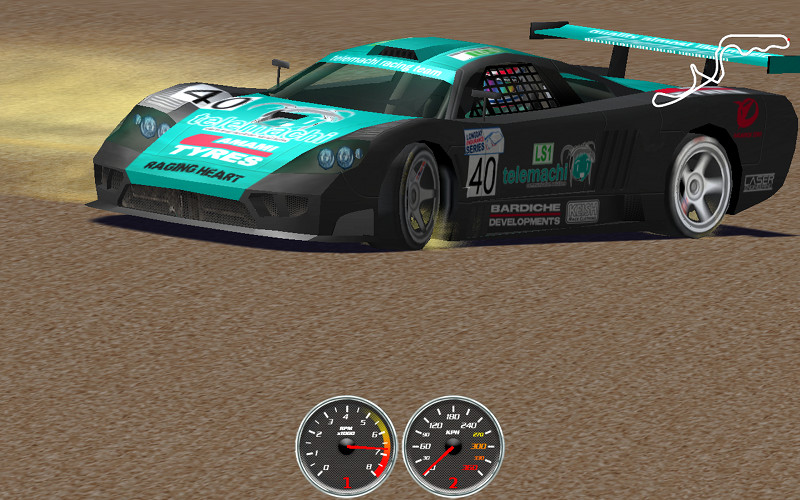
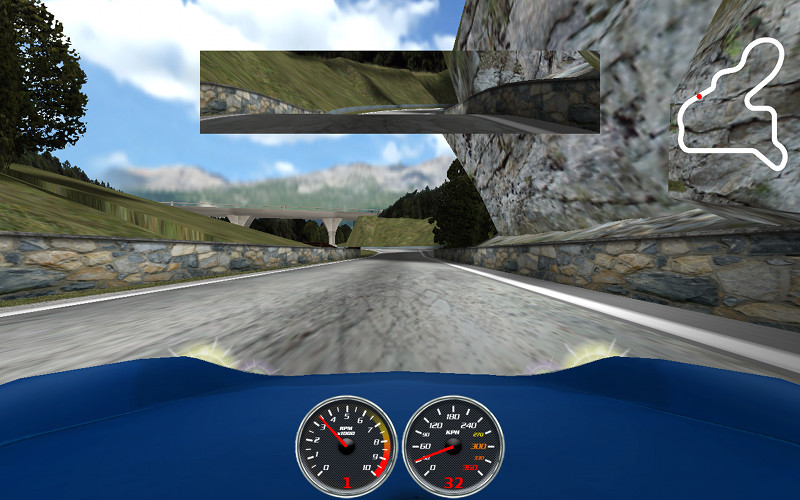


    Speed Dreams is a fork of the famous open racing car simulator Torcs, aiming to implement exciting new features, cars, tracks and AI opponents to make a more enjoyable game for the player, as well as constantly improving visual and physics realism.

In other words, Speed Dreams is the place:
  • where developers can try their ideas and have every chance to get them released to the end-users (democracy is the main principle ruling the dev team),
  • where end-users can enjoy the completion of these ideas and give their opinion about it, and/or make new suggestions.

So, if you find your or some people's Torcs patch proposals don't integrate the official release as quickly as you would have loved, you have reached the right place!

Anyone can join the development team, contributions to Speed Dreams may take place in many domains:
  • The core code itself, and its numerous subjects : user interface, physics engine, 3D graphics engine, race management, input device related code, file formats, ... to enhance, optimize, make more up-to-date, fix bugs, port to another platform ...
  • the robot(s) code (AI racing)
  • the cars design or tuning
  • the tracks design
  • the documentation
Current features of Speed-Dreams as of 2.0 beta:
  • 38 tracks
  • 16 tracks with full scenery and terrain
  • 28 cars
  • Animated drivers with some cars
  • 10 camera modes
  • Close to realistic physics
  • Experimental full 3D physics engine (user selectable)
  • Supported input devices: Keyboard, Wheel, Joystick, Mouse, Gamepad
  • Customizable controls
  • Automatic shifting, ABS, ASR
  • 2 completely different AI opponent sets, Simplix and USR

Build a 3d Printer

    As an Open Source and enthusiast, couldn't be more pleased to introduce the RepRap 3d printer. The RepRap is an Open Source hardware project under a larger initiative called the Open Source Ecology project aka Global Village Construction Set. Being an open source project the RepRap can be built by following a set of free blueprints from www.RepRap.org, and anyone can submit improvements to the blueprints or build process. One of the key features to the RepRap is that it can print itself aside from a couple processing chips, so you'll print out some for your friends, who hopefully will print ones for their friends and so on.

This device was printed out using a 3D printer. No assembly required!
Brain Gear - Download and Print


This puzzle contains almost 1000 moving parts.
The Petaminx - Download and Print


Build instructions for the simplest RepRap, includes a parts list and videos of the setup process http://reprap.org/wiki/Prusa_Build_Manual


    It works by heating and extruding a thin plastic wire that is purchased as large spools - PLA Clear 1kg spool 3mm. The material that is printed can actually be made from a plant material that would set the way for using broken items as compost. The two common materials used for printing are ABS and PLA. Both are easily purchased but the one I'd recommend is the PLA as it is the material that is made from plant starches and is biodegradable. While the PLA can be home grown the purchased spools are going be stronger.

    The fact that PLA can be biodegraded, and re used to grow more PLA makes it much more attractive for me. One of the main problems with traditional plastics is the fact that they do not biodegrade easily.

    The third world, and manufacturing centers like Taiwan and China are covered in plastic garbage that does not decompose and does not go away, and can not be recycled into quality goods. If switching to PLA will reduce that even a little bit, I think it would be a huge advantage.

    ABS is the stuff legos are made out of  and PLA is made from corn.

TED Talks - We Can Recycle Plastic ( if you just have to print with ABS this should make you feel better)


    Aside from just printing plastic parts the RepRap can print out metals that allow it to print circuit boards, but not processor chips, there are other types of adapters that are in the works though.

This is the man that started the RepRap, Adrian Bowyer


Watch the RepRap print a simple part and listen to the info about the RepRap.


    Having an awesome 3d printer wouldn't be quite as awesome if there wasn't a library of free files to download and print at anytime. There is the RepRap Object Library which is a good place to start for beginners. It has objects available to download and print, but also contains learning resources and links to get going creating your own objects to print. Another place to get free files to download and print with the RepRap is Thingiverse, which is a great site.

Here are some examples from Thingiverse
Vogal The Dragon

A Printable V8 Motor           
 Yoda


    Where the RepRap project scores over large scale manufacturing is the ability to promote quick innovation and "Distributed Thinking". An example of that is on the website Thingiverse any item uploaded, can be altered by another user and re-uploaded, and Thingiverse shows this. The website let's users say that their object was derived from so and so, and will also display that it has 13 variations of it's own and so on.

Digital Makeup with Blender

    Can we afford some actual makeup artists, who will turn our actors into some jaw dropping visual effects characters who are covered with gore, blood, bolts, cables, jelly or whatever is required?
Or can we do that all digitally?

     The basic idea for digtal makeup is easy, as long as you do not think about it too long. Just have a digital double, track the head, body, limbs or whatever, apply the textures, props or clothes to that digital version of your actor and composite it over the actual footage of your actor. Here’s an example from Sebastian König:

Digital Makeup in Blender from Sebastian König on Vimeo.


Second Face Deform Test from Sebastian König on Vimeo.


     As seen in the example Sebastian used object markers for tracking various points on his face, but doing it this way can lead to problems with tracking when a character makes turns a certain way, or has hair in there face, or even a fast movement could mess up the tracking. There will soon be another method added for tracking that will address this issue. We don’t have a kind of tracking called planar tracking yet, but our awesome libmv developer Keir Mierle has something in the pipeline called “affine tracking”, which might help in this case. So with some luck we can do digital makeup without object-tracking.

Intro to New Blender Features

    The release of Blender 2.61 is a pretty big milestone with some really impressive new features that will likely draw in a torrent of new users. The feature that long time blender users are most appreciative for would have to be the new Cycles render engine. The feature that will most likely draw new users would have to be the motion tracking, which let's users put 3d objects in movies.

Cycles Render Engine
     Before Blender 2.61 when rendering a 3d scene that was indoors or most scenes for that matter, the render lacked certain light elements that left the scene looking blan and not real. With the Cycles render engine the lighting is handled completely differently and it shows as the renders are allot more realistic. Another feature of cycles is that it features OpenCL and will use graphics cards for rendering where possible.


In this tutorial from Andrew Price of Blender Guru you will discover:

  • The difference between the internal renderer and Cycles
  • Some of the cool features of Cycles
  • How to create your very first Cycles render
  • Using lights, materials, textures and bump mapping
  • How he made the donut scene


Motion Tracking
    Blender as a video editor is a pretty powerful tool, and with the new motion tracking features things just got serious. Mixing people into 3d scenes had been doable for a long while now, but with motion tracking we can now put 3d objects into movies.

A small 10 second example


A quick run through of setting up motion tracking. In this video the ground has already been mapped and the object is getting mapped.


    The other new features for blender 2.61 include ocean simulation, dynamic paint, camera sensor size and presets, 3D mouse color wheel editing, and more translations to other languages. New Addons in this release are an Adobe After Effects exporter, an Acclaim and C3D motion capture importers. Not to mention the 108 bug fixes and improved methods for new developers to make addons.

Blender is a free and Open Source Software get it at www.blender.org/get-blender/
Release notes for Blender 2.61 http://www.blender.org/development/release-logs/blender-261/
Demo files to that open in Blender's to try the new features  http://www.blender.org/development/release-logs/blender-261/blender-261-demo-files/

Openshot Video Editor

    Openshot is a free and Open Source video editor. It is really easy to use and has lots of great features that are also easily used. Such as the 3d title animations, they are really simple to setup, just fill out a little wizard and hit render. To create the 3d title animations Openshot uses scripts that are controlled by the easy to use wizard and aimed at an installed copy of Blender.

Screenshot of the 3d title animation wizard


    Dream. Create. Share. Video editing on Linux has never been easier or more fun. If you create an awesome video with OpenShot, please share it with us. And remember to tag your videos with the word "openshot" on YouTube so others can discover them.

Here is a little video I put together with Openshot

jME3 and Android Java 3D Game Development

    The open source community is always providing an amazing array of useful software. It also has great set of tools to work with. I'll introduce you to a combination of a couple tools that I'm using for 3d game development.

    jMonkeyEngine (jME) is a game engine made especially for modern 3D development, as it uses shader technology extensively. jMonkeyEngine is written purely in Java and uses LWJGL as its default renderer.OpenGL 2 through OpenGL 4 is fully supported.

    jMonkeyEngine is a community-centric open source project released under the new BSD license. It is used by several commercial game studios and educational institutions. The default jMonkeyEngine 3 download comes readily integrated with an advanced SDK that makes it more like a studio.
    By itself, jMonkeyEngine is a collection of libraries, making it a low-level game development tool. Coupled with an IDE like the official jMonkeyEngine 3 SDK it becomes a higher level game development environment with multiple graphical components.

Here is a Demo reel of jME from early 2011


    Using Blender3d you can save models with textures, animations, particles and more as a blend file then open them in the jME3 SDK and drop them into your game. On top of all that jME3 will compile to an android install package, if you point it to the android sdk. 

    Another piece of free and open source software in jME3 is the Nifty GUI. Below is a video demonstration of some of Nifty GUI's features. More on jME3 to come soon.


    One thing is for sure, it wouldn't be 3d with out Blender. Blender is a free and open-source 3D computer graphics software product used for creating animated films, visual effects, interactive 3D applications or video games. Blender's features include 3D modelingUV unwrappingtexturingrigging and skinning, fluid and smoke simulation, particle simulation, animatingrenderingvideo editing and compositing.

Here is a Demo reel of Blender made in 2011


    Blender has so many features it is more like a studio of software it's just amazing what it can do. Being Open Source and free there is a huge community of users helping noobs! Such as Andrew Price's website www.blenderguru.com where there are many in depth tutorials on using blender, plus a file that you can open in Blender and compare yours with his. There is also place to download free models such as www.blendswap.com and with creative commons licenses they can be reused and built upon.

    Blender has a physics engine and tools in place to create games without knowing any programming, which is awesome but for programmers to simple. That's where jMonkey Platform comes in.

Check out the links, get the software and have fun creat!

Linux Mint LXDE on Netbook Follow-Up

    Have been using Linux Mint LXDE on a Acer aspire one netbook with a half a gig of RAM, and it has been pleasant. Most of the time am running chromium and firefox with around 10 tabs open amongst them, and the little netbook keeps pushing with out any major slowdowns. It's quite responsive actually.

    Lately though have been doing java development on the netbook. Have installed eclipse and the android SDK, eclipse is versatile enough to be usable on the small screen of the netbook with out having a negative effect on the workflow. Of course using the android emulator could be an issue, one which I choose to avoid by just testing on a real android device.

    What really makes using the netbook for my development purposes possible, is libGDX. libGDX is a cross-platform library that allows you to simultaneously build for the desktop and for Android devices. With libGDX I can be doing little tests while at the desk and then do more in depth tests on the couch or in bed with an android device.

 Here is a video of a libGDX demo game


and here is the creator of libGDX showing a demo of the UI library


To get started developing with libGDX watch the video below to see how.


    Thanks for reading, and look forward to more details about libGDX as I get more into it and a detailed post about another java game engine called JMonkey.

27 Blender Creations

    A long time user of Blender and writer at BlenderArtist has put together a web page with animations created with Blender by the community over the years. Watching them should inspire everyone to keep creating awesome videos cause Blender just keeps improving and has a feature set that is to long to list. My favorite video of the bunch is directed by Junichi Yamamoto and is called Memory. 


    Link to 27 inspirational and jaw dropping Blender videos @ BlenderGuru.com

Blender is Amazing

    Blender is an amazing program that started as a commercial program but was donated to the Open Source Community. They knew if they open sourced the developement (made it free) and sold the manual everyone would benefit. Not to say someone has to pay to learn to use blender, on the contrary, there is tons of great free learning material. Personally enjoy the tutorials from Andrew Price the BlenderGuru. The image was made with help from Andrew, followed the intro to compositing, to get the effect on the text, he makes good tutorials that were easy to follow. Definitely returning to his site for all blender related questions.

   Currently under a major overhaul the application has tons of new features, and has even made it's way into Hollywood. Have read that it was used in the production of one of the Lord of the Rings films, and don't doubt it.

Here is production from the Blender Foundation.
    "Sintel" is an independently produced short film, initiated by the Blender Foundation as a means to further improve and validate the free/open source 3D creation suite Blender. With initial funding provided by 1000s of donations via the internet community, it has again proven to be a viable development model for both open 3D technology as for independent animation film.
This 15 minute film has been realized in the studio of the Amsterdam Blender Institute, by an international team of artists and developers. In addition to that, several crucial technical and creative targets have been realized online, by developers and artists and teams all over the world.

For a detailed list of features check out Blender's website,

Blender is easy to install, has a relatively small installation size, and runs on several popular computing platforms, including Linux, Mac OS X, and Microsoft Windows, along with FreeBSD, IRIX, NetBSD, OpenBSD and Solaris. Unofficial ports are also available for AmigaOS 4, BeOS, MorphOS , Pocket PC and SkyOS. Though it is often distributed without documentation or extensive example scenes, the software contains features that are characteristic of high-end modeling software. Among its capabilities are:
  • Basic non-linear video/audio editing and compositing capabilities.
  • Support for a variety of geometric primitives, including polygon meshes, fast subdivision surface modeling, Bezier curves, NURBS surfaces, metaballs, digital sculpting, and outline fonts.
  • Versatile internal rendering capabilities and integration with YafaRay, a Free Software ray tracer.
  • Keyframed animation tools including inverse kinematics, armature (skeletal), hook, curve and lattice-based deformations, shape keys (morphing), non-linear animation, constraints, vertex weighting, soft body dynamics including mesh collision detection, LBM fluid dynamics, Bullet rigid body dynamics, particle-based hair, and a particle system with collision detection.
  • Modifiers to apply non-destructive effects.
  • Python scripting for tool creation and prototyping, game logic, importing and exporting from other formats such as OBJ, FBX, DXF, COLLADA, task automation and custom tools.
  • Game Blender, a sub-project, offers interactivity features such as collision detection, dynamics engine, and programmable logic. It also allows the creation of stand-alone, real-time applications ranging from architectural visualization to video game construction.
  • A fully-integrated node-based compositor within the rendering pipeline