Have discovered this program when attempting to find a secure method of sharing digital art. The program is called RetroShare and looks promising. Retroshare is all about sharing and communicating with trusted Friends. This is the core design of Retroshare: a decentralised Friend-2-Friend network, which allows you to share stuff... not with the whole world... but with people you know and trust.
THE DARK MOD is a free, first-person stealth game inspired by the Thief series by Looking Glass Studios. It recreates the essence of the original Thief games on a more modern engine. This project is both a game and a mission-creation platform, The Dark Mod allows players and mappers alike to enjoy missions in a gothic steampunk universe.
Out of all the great music players out the Clementine is a personal favorite. On Linux we have quite a few options for a top notch music player and library manager, there is Banshee which is written with mono which is a cross-platform programming language that takes minimal code changes to target multiple platforms. While Banshee used to be the default on some systems it isn't the default on many nowadays as allot of the Linux distros have have decided to shy away from packaging the mono framework with their installation. Instead you'll most likely be Rythmbox if you using a GNOME based install or Amarok if your using a KDE base install. All of the music players with the exception of Rythmbox can be installed on Winows as well. If I wasn't using Clementine I'd definitely be using Amarok, there are a ton of cool features that aren't necessary but really nice, like the wikipedia article about the track that's playing for example.
Imagine there are three computers monitors at the desk (not really hard to imagine though) and they are each running on a separate machine with different operating systems. Now picture dragging the mouse across all three seamlessly. Well stop imagining and go download Synergy.
This is a really useful Open Source project, but it's not gonna be able to replace a KVM switch (keyboard, video, mouse) because if I'm running different machines on my monitors, it is to fix another computer and don't wan't to install anything unnecessary to get it fixed. Could Picture the scenario where after getting back from work, the laptop gets setup on the desk, and then use Synergy to have the desktop mouse and keyboard to control the laptop without having to plug anything in or enable bluetooth.
So there is that unstable, or just released program that you have just got to try and don't got a spare machine to try it out on, or don't want to risk damaging your main system. Well why not try that program out in a VirtualBox.
VirtualBox lets users install operating systems inside their current OS. The main OS is the Host, and the other OS's are called the Guest. Users can run many systems at one time with VirtualBox, in fact allot of servers run hundreds of VirtualBox images at one time, all day everyday.
To get started using VirtualBox Windows can go to VirtualBox Downloads and install the right package for their system. Linux users can install VirtualBox-OSE (Open Source Edition) from their respective package manager.
To add the oracle maintained repository and install VirtualBox using a Debian based Linux distro (Ubuntu, Mint), copy paste this command into a terminal:
After installing VirtualBox you'll want to install an OS (operating system) to it. I recommend a lightweight Linux distro such as Xbuntu or Lubuntu. Download either of those ISOs and then launch VirtualBox, click new and point it to the ISO. After that it's just a matter of following all the on screen prompts to get the system up and running.
When testing out software in the VirtualBox you'll probably want to open it up to the internet. Was having an issue with this, as every time it was tested to see if it was broadcasting on the internet there was an error, which ended up being a loop back error in the router ( trying to go out to the net and back in).
What did work for me was changing the adapter setting on the machine to Bridged Adapter then go into the setting of the guest OS and change the IP to a static IP. Open up the ports on the router and the VM should be broadcasting. Again I had an issue and couldn't test that it was working from home, had to actually leave and go to another location to verify it worked (router loopback error).
It's kinda hard to remember the IP addresses, that and they are constantly changing unless it is a static IP, so to access the VM use NO-IP. They provide 3 free host names for your IP addressing needs, making it much easier to share your VM on the internet.
There are tons of free cloud web services out there such as Google Drive, Ubuntu One, and iCloud from apple all offering 5 gigabytes of space which is perfect for keeping those really important files backed up. What about pricing though, how much is it for 50 gigabytes or 100 gigabytes?
Google Drive is asking $2.50 a month for 25 gigabytes, $5.00 a month for 100 gigabytes, and $50 a month for 1 terabyte. Ubuntu One works a little differently if you buy 1 song from the music store they give you 20 gigabytes for free for 6 months then charge you $4.00 a month. Apple's iCloud is charging $3.25 for 10 gigabytes of storage.
0 A.D (pronounced “zero-ey-dee”) is a historical Real Time Strategy (RTS) game under development by Wildfire Games, a global group of volunteer game developers. As the leader of an ancient civilization, you must gather the resources you need to raise a military force and dominate your enemies. Have never played a RPG or RTS for more then 15 minutes, but look forward to getting deep into this game.
Ubuntu is one of the most popular versions of Linux on desktops and laptops, and soon to be in your tv, phone, and who knows what else. Development of Ubuntu is led by Canonical, Ltd. a company owned by Ubuntu's "self-appointed benevolent dictator for life, South African entrepreneur Mark Shuttleworth. Canonical generates revenue through the sale of technical support and services related to Ubuntu, and since version 12.10, by displaying advertisements in Unity Dash, the default file manager in the standard desktop version of Ubuntu. According to Canonical, the Ubuntu project is committed to the principles of free software development; people are encouraged to use free software, improve it, and distribute it
Ubuntu is a fork of the Debian project's codebase. The original aim of the Ubuntu developers was to create an easy-to-use Linux desktop, which has led to a large user base as well as helping people new to Linux switch over. On a side note Windows users can install Ubuntu right in Windows, Ubuntu will install into Windows as an application that will give users access to all the great and Open Source Software that only runs on Linux without having to leave Windows.
Mark Shuttleworth Keynote from Ubuntu Developers Summit. Mark covers topics such as Steam coming to Linux, Ubuntu desktop for Android and What to expect on the server side.
Founded in 1997, FlightGear is developed by a worldwide group of volunteers, brought together by a shared ambition to create the most realistic flight simulator possible that is free to use, modify and distribute. FlightGear is used all over the world by desktop flight simulator enthusiasts, for University research and education, for a variety of aerospace engineering and visualization work in industry, and even for interactive exhibits in museums.
FlightGear features more than 400 aircraft, a worldwide seamless scenery database, a multi-player environment, detailed sky modelling, a flexible and open aircraft modelling system, varied networking options, multiple display support, a powerful scripting language, and an open architecture. Best of all, being open-source, the simulator is owned by the community and everyone is encouraged to contribute.
Have heard that with the right equipment playing the FlightGear simulator could be used as pilot hours towards a pilots license. The features available in this open source project are amazing, not to mention just the scenerey would fill more then 3 DVDs. Check out the feature list at http://www.flightgear.org/about/features/
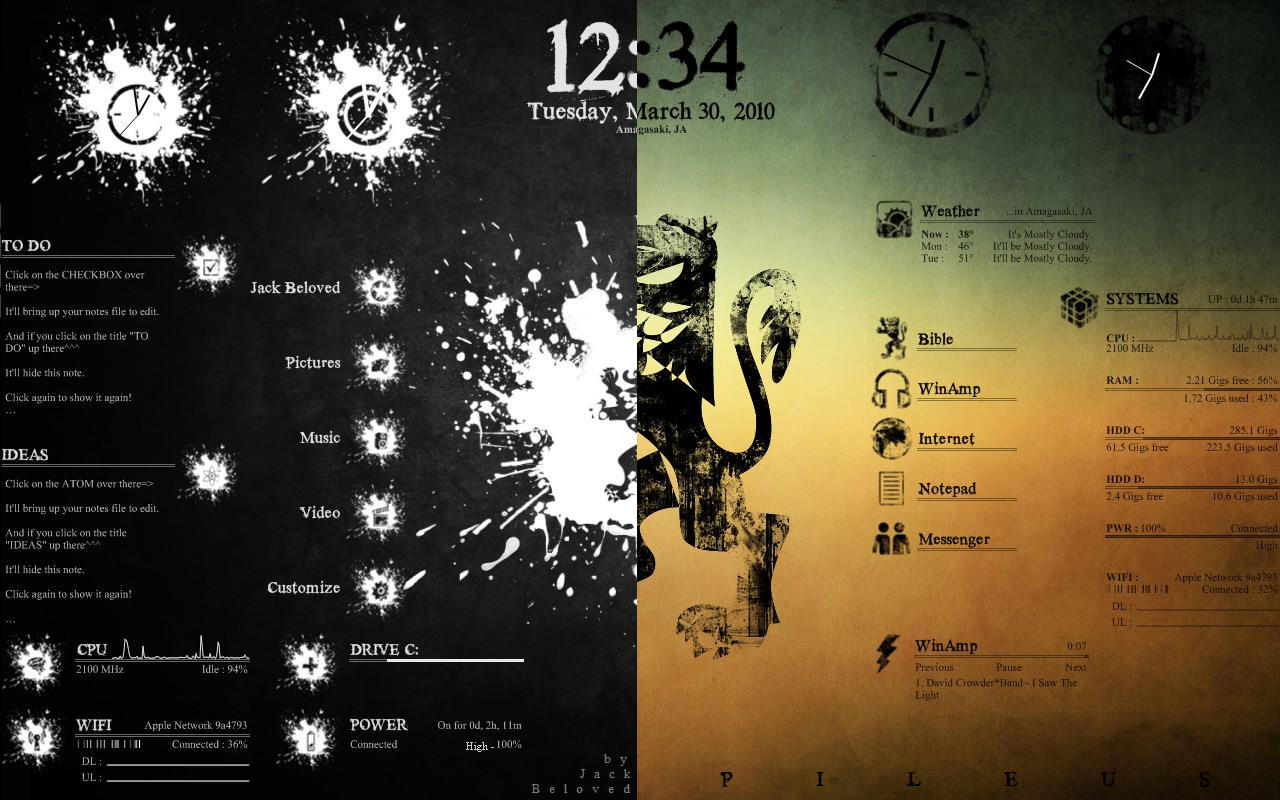
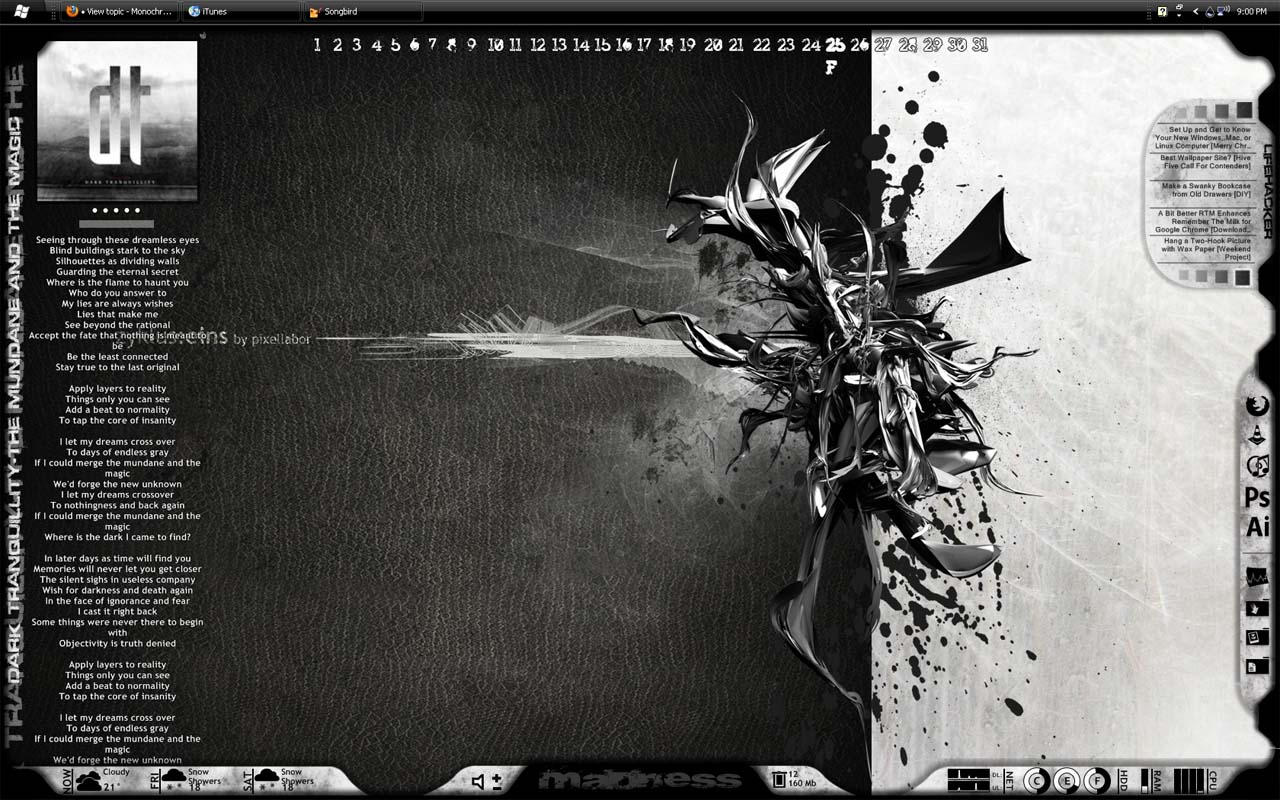
Have yet to cover a Windows only piece software on the blog yet, but plenty of Linux only software. With Linux there are many options for the desktop and even more options for each desktop interface, but with Windows you need third-party software to get a really customized desktop. Well that software is called Rainmeter, and is open source and free to download.
Here are a couple of example of what Rainmeter can do. All the skins are easily customized and parts from different skins can be combined, or you could make your own from scratch which is made easy by allowing the creators to focus on the look by plugging there artwork into functions that are already available.
Rainmeter is the best known and most popular desktop customization program for Windows. Enhance your Windows computer at home or work with skins; handy, compact applets that float freely on your desktop. Rainmeter skins provide you with useful information at a glance. It's easy to keep an eye on your system resources, like memory and battery power, or your online data streams, including email, RSS feeds, and weather forecasts.
Many skins are even functional: they can record your notes and to-do lists, launch your favorite applications, control your media player - all in a clean, unobtrusive interface that you can rearrange and customize to your liking.
There are thousands and thousands of skins available, crafted by a large and ever-growing community of Rainmeter users. !!! WARNING !!! Be careful where you get your skins and plugins, try to only get skins from rainmeter.net and when downloading from deviantart.com make sure the comments aren't disabled on that skin!
Rainmeter is not just an application, it is a robust toolkit. Create and modify your own skins in a simple language that's easy to learn, with the help of extensive documentation, getting started guide and skin tutorials. Skins call upon measures, a set of powerful built-in modules that do all the heavy lifting, and create interactive meters to display that information however you decide. In this way, Rainmeter brings productive innovation together with creative artistry like no other platform of its kind.
Over the last few years, a thriving community has built up around Rainmeter, as average users freely contribute their own original skins, their generous knowledge and support, and their inspirational ideas to a project whose scope and capabilities are constantly expanding.
Rainmeter is designed for YOUR system. Rainmeter uses very little CPU and RAM resources, has a tiny space footprint, and will run perfectly well on any hardware using Windows XP through Windows 8.
Rainmeter is free and open source. Rainmeter is open source software distributed free of charge under the terms of the GNU GPL v2 license. If you want to get involved, check the Developers page.