
Showing posts with label Desktop. Show all posts
Showing posts with label Desktop. Show all posts
Graphical Manager for systemd
Clementine Music Player & ProjectM

Out of all the great music players out the Clementine is a personal favorite. On Linux we have quite a few options for a top notch music player and library manager, there is Banshee which is written with mono which is a cross-platform programming language that takes minimal code changes to target multiple platforms. While Banshee used to be the default on some systems it isn't the default on many nowadays as allot of the Linux distros have have decided to shy away from packaging the mono framework with their installation. Instead you'll most likely be Rythmbox if you using a GNOME based install or Amarok if your using a KDE base install. All of the music players with the exception of Rythmbox can be installed on Winows as well. If I wasn't using Clementine I'd definitely be using Amarok, there are a ton of cool features that aren't necessary but really nice, like the wikipedia article about the track that's playing for example.
KDE Connect - Mobile Integration

Some of the features now available are:
- Call & SMS Notifications
- App Notification & Alerts
- Battery Status Support
- Clipboard Syncing
- Media Player Controls
- File Transfer

Low Ram Linux Desktop

Linux is well known to run on all kinds of hardware from the oldest machines to the worlds super computers, and am always coming across friends that have older machines with only half a gig of RAM but most modern desktops recommend at least one gig of RAM. While it might not cost much to upgrade, I still think that a PC can still be comfortably usable without upgrading.
Concrete5 a concrete CMS

Heard about Concrete5 in a podcast from twit.tv called Floss Weekly [ FLOSS Weekly 239 ]. Am currently using Podax on Android to retrieve and listen to my podcasts and gPodder on my desktop to manage the shows I want. That's a hole other topic though so let's get back to how awesome Concrete5 is, and how they have successfully utilized Open Source and Creative Commons as the basis for their business model.
Concrete5 is a content management system that is free and open source, made for marketing but built for geeks. Concrete5 was designed for ease of use, for users with minimum technical skill can still make beautiful pages. It enables users to edit site content directly from the page. It provides version management for every page, similar to wiki software, so any edits can be viewed and reverted back to, also allows users to edit images through an embedded editor on the page.
Synergy - Share Your Mouse
Imagine there are three computers monitors at the desk (not really hard to imagine though) and they are each running on a separate machine with different operating systems. Now picture dragging the mouse across all three seamlessly. Well stop imagining and go download Synergy.

This is a really useful Open Source project, but it's not gonna be able to replace a KVM switch (keyboard, video, mouse) because if I'm running different machines on my monitors, it is to fix another computer and don't wan't to install anything unnecessary to get it fixed. Could Picture the scenario where after getting back from work, the laptop gets setup on the desk, and then use Synergy to have the desktop mouse and keyboard to control the laptop without having to plug anything in or enable bluetooth.
Website: http://synergy-foss.org/ Download [ User Guide ]
Issue Tracker: http://synergy-foss.org/issues/
Source Code: http://synergy-foss.org/code/

This is a really useful Open Source project, but it's not gonna be able to replace a KVM switch (keyboard, video, mouse) because if I'm running different machines on my monitors, it is to fix another computer and don't wan't to install anything unnecessary to get it fixed. Could Picture the scenario where after getting back from work, the laptop gets setup on the desk, and then use Synergy to have the desktop mouse and keyboard to control the laptop without having to plug anything in or enable bluetooth.
Website: http://synergy-foss.org/ Download [ User Guide ]
Issue Tracker: http://synergy-foss.org/issues/
Source Code: http://synergy-foss.org/code/
VirtualBox

VirtualBox lets users install operating systems inside their current OS. The main OS is the Host, and the other OS's are called the Guest. Users can run many systems at one time with VirtualBox, in fact allot of servers run hundreds of VirtualBox images at one time, all day everyday.
To get started using VirtualBox Windows can go to VirtualBox Downloads and install the right package for their system. Linux users can install VirtualBox-OSE (Open Source Edition) from their respective package manager.
To add the oracle maintained repository and install VirtualBox using a Debian based Linux distro (Ubuntu, Mint), copy paste this command into a terminal:
sudo sh -c "echo 'deb http://download.virtualbox.org/virtualbox/debian '$(lsb_release -cs)' contrib non-free' > /etc/apt/sources.list.d/virtualbox.list" && wget -q http://download.virtualbox.org/virtualbox/debian/oracle_vbox.asc -O- | sudo apt-key add - && sudo apt-get update && sudo apt-get install virtualbox-4.1 dkms
After installing VirtualBox you'll want to install an OS (operating system) to it. I recommend a lightweight Linux distro such as Xbuntu or Lubuntu. Download either of those ISOs and then launch VirtualBox, click new and point it to the ISO. After that it's just a matter of following all the on screen prompts to get the system up and running.

When testing out software in the VirtualBox you'll probably want to open it up to the internet. Was having an issue with this, as every time it was tested to see if it was broadcasting on the internet there was an error, which ended up being a loop back error in the router ( trying to go out to the net and back in).

What did work for me was changing the adapter setting on the machine to Bridged Adapter then go into the setting of the guest OS and change the IP to a static IP. Open up the ports on the router and the VM should be broadcasting. Again I had an issue and couldn't test that it was working from home, had to actually leave and go to another location to verify it worked (router loopback error).

It's kinda hard to remember the IP addresses, that and they are constantly changing unless it is a static IP, so to access the VM use NO-IP. They provide 3 free host names for your IP addressing needs, making it much easier to share your VM on the internet.
ownCloud - Your Own Personal Cloud

Google Drive is asking $2.50 a month for 25 gigabytes, $5.00 a month for 100 gigabytes, and $50 a month for 1 terabyte. Ubuntu One works a little differently if you buy 1 song from the music store they give you 20 gigabytes for free for 6 months then charge you $4.00 a month. Apple's iCloud is charging $3.25 for 10 gigabytes of storage.
Real Time Strategy Game 0 AD

0 A.D (pronounced “zero-ey-dee”) is a historical Real Time Strategy (RTS) game under development by Wildfire Games, a global group of volunteer game developers. As the leader of an ancient civilization, you must gather the resources you need to raise a military force and dominate your enemies. Have never played a RPG or RTS for more then 15 minutes, but look forward to getting deep into this game.

Ubuntu - Mark Shuttleworth Keynote Speech

Ubuntu is a fork of the Debian project's codebase. The original aim of the Ubuntu developers was to create an easy-to-use Linux desktop, which has led to a large user base as well as helping people new to Linux switch over. On a side note Windows users can install Ubuntu right in Windows, Ubuntu will install into Windows as an application that will give users access to all the great and Open Source Software that only runs on Linux without having to leave Windows.
Mark Shuttleworth Keynote from Ubuntu Developers Summit. Mark covers topics such as Steam coming to Linux, Ubuntu desktop for Android and What to expect on the server side.
Get Ubuntu: http://www.ubuntu.com/
Learn and Get Help With and Ubuntu: https://help.ubuntu.com/community
Develop for Ubuntu: http://developer.ubuntu.com/
FlightGear a Flight Simulator

Founded in 1997, FlightGear is developed by a worldwide group of volunteers, brought together by a shared ambition to create the most realistic flight simulator possible that is free to use, modify and distribute. FlightGear is used all over the world by desktop flight simulator enthusiasts, for University research and education, for a variety of aerospace engineering and visualization work in industry, and even for interactive exhibits in museums.

FlightGear features more than 400 aircraft, a worldwide seamless scenery database, a multi-player environment, detailed sky modelling, a flexible and open aircraft modelling system, varied networking options, multiple display support, a powerful scripting language, and an open architecture. Best of all, being open-source, the simulator is owned by the community and everyone is encouraged to contribute.

Have heard that with the right equipment playing the FlightGear simulator could be used as pilot hours towards a pilots license. The features available in this open source project are amazing, not to mention just the scenerey would fill more then 3 DVDs. Check out the feature list at http://www.flightgear.org/about/features/
Start downloading FlightGear for free on Windows, Mac, & Linux from http://www.flightgear.org
Watch FlightGear in action
Mixxx - DJ Software Review
Mixxx has everything you need to start making DJ mixes in a tight, integrated package. Whether you're DJing your next house party, spinning at a club, or broadcasting as a radio DJ, Mixxx has what you need to do it right.
Best of all it's Open Source, free and available for Windows, Mac, and Linux!
Here is a quick 5 minute review of Mixxx by InfinityGalatic (who's been doing Linux App reviews on youtube). He is using the Ubuntu Linux Operating System which is also free and Open Source.
Links:
Download: Mixxx DJ Software http://www.mixxx.org
Download: Ubuntu Linux http://www.ubuntu.com
Old Post featuring Mixxx http://openrelish.blogspot.com/2011/10/dj-software.html
Windows Desktop Customizer
Have yet to cover a Windows only piece software on the blog yet, but plenty of Linux only software. With Linux there are many options for the desktop and even more options for each desktop interface, but with Windows you need third-party software to get a really customized desktop. Well that software is called Rainmeter, and is open source and free to download.
Here are a couple of example of what Rainmeter can do. All the skins are easily customized and parts from different skins can be combined, or you could make your own from scratch which is made easy by allowing the creators to focus on the look by plugging there artwork into functions that are already available.
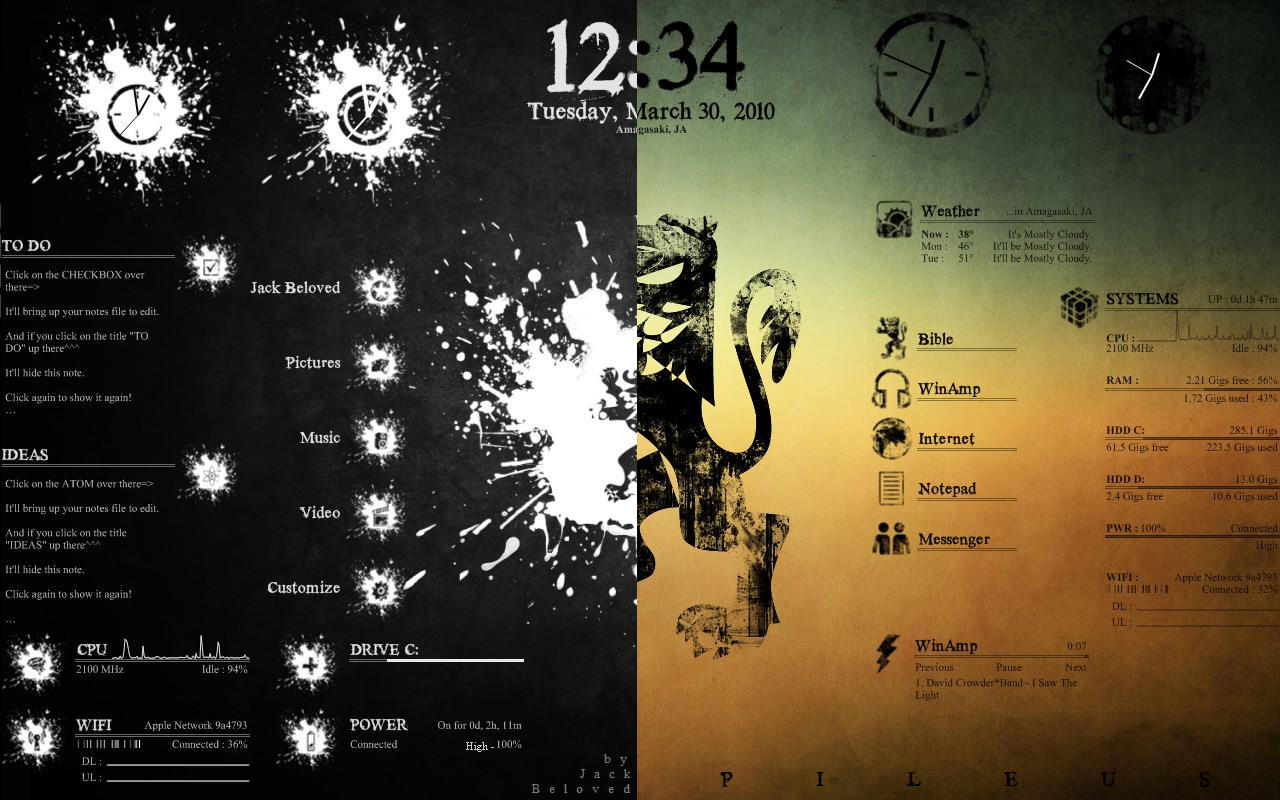
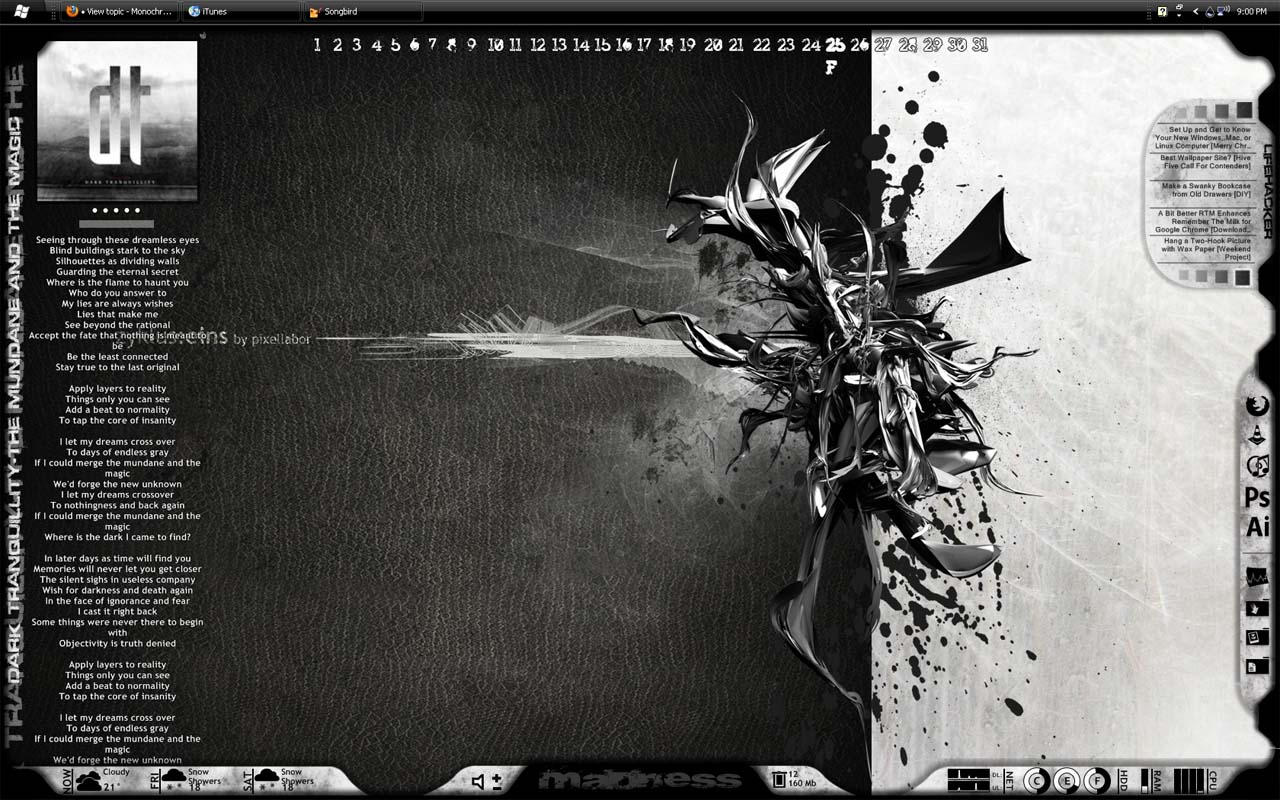

Rainmeter is the best known and most popular desktop customization program for Windows. Enhance your Windows computer at home or work with skins; handy, compact applets that float freely on your desktop. Rainmeter skins provide you with useful information at a glance. It's easy to keep an eye on your system resources, like memory and battery power, or your online data streams, including email, RSS feeds, and weather forecasts.
Many skins are even functional: they can record your notes and to-do lists, launch your favorite applications, control your media player - all in a clean, unobtrusive interface that you can rearrange and customize to your liking.
There are thousands and thousands of skins available, crafted by a large and ever-growing community of Rainmeter users. !!! WARNING !!! Be careful where you get your skins and plugins, try to only get skins from rainmeter.net and when downloading from deviantart.com make sure the comments aren't disabled on that skin!
Rainmeter is not just an application, it is a robust toolkit. Create and modify your own skins in a simple language that's easy to learn, with the help of extensive documentation, getting started guide and skin tutorials. Skins call upon measures, a set of powerful built-in modules that do all the heavy lifting, and create interactive meters to display that information however you decide. In this way, Rainmeter brings productive innovation together with creative artistry like no other platform of its kind.
Over the last few years, a thriving community has built up around Rainmeter, as average users freely contribute their own original skins, their generous knowledge and support, and their inspirational ideas to a project whose scope and capabilities are constantly expanding.
Rainmeter is designed for YOUR system. Rainmeter uses very little CPU and RAM resources, has a tiny space footprint, and will run perfectly well on any hardware using Windows XP through Windows 8.
Rainmeter is free and open source. Rainmeter is open source software distributed free of charge under the terms of the GNU GPL v2 license. If you want to get involved, check the Developers page.
Official website http://rainmeter.net/cms
Rainmeter 101 http://rainmeter.net/cms/Rainmeter101
The source code is on Github https://github.com/rainmeter/rainmeter
OpenEMR - Electronic Medical Records
Recently came across this software used to keep hospital records while browsing a site called BigThink. It is called Open-EMR (Electronic Medical Records), a 10 year old project with ~500,000 lines of code, became one of the first PHP projects to become a government certified EHR. OpenEMR is an ONC-ATB Ambulatory EHR 2011-2012 certified electronic health records and medical practice management application. It is written in php and runs on LAMP systems, most of the developers are Linux enthusiasts but the user base for the software is mainly Windows machines.
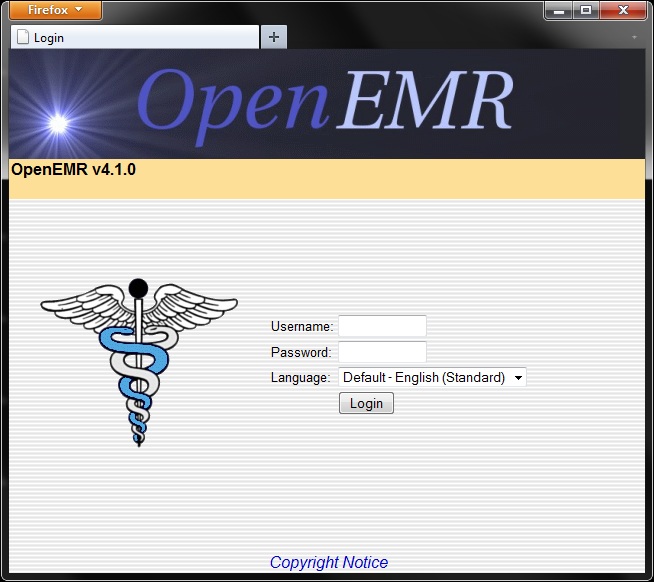

The website for the application http://www.open-emr.org/
The non-profit organization for the application http://www.oemr.org/
List of OpenEMR's features http://www.open-emr.org/wiki/index.php/OpenEMR_Features
Online demo of the software http://www.open-emr.org/wiki/index.php/OpenEMR_Version_4.1.0_Demo
A presentation about Open-EMR http://www.openaffairs.tv/2011/06/open-emr-presentation-and-discussion-at-portland-linux-user-group/
Download the application and or the source code http://www.open-emr.org/wiki/index.php/OpenEMR_Downloads
The website for the application http://www.open-emr.org/
The non-profit organization for the application http://www.oemr.org/
List of OpenEMR's features http://www.open-emr.org/wiki/index.php/OpenEMR_Features
Online demo of the software http://www.open-emr.org/wiki/index.php/OpenEMR_Version_4.1.0_Demo
A presentation about Open-EMR http://www.openaffairs.tv/2011/06/open-emr-presentation-and-discussion-at-portland-linux-user-group/
Download the application and or the source code http://www.open-emr.org/wiki/index.php/OpenEMR_Downloads
Skeltrack - Control Linux with Camera and Body
Skeltrack is a Free and Open Source Software library for tracking skeleton joints from depth images.
It is implemented with GLib and uses plain mathematics to detect the human skeleton and although it does not use any database, it was inspired by Andreas Baak's paper: A Data-Driven Approach for Real-Time Full Body Pose Reconstruction from a Depth Camera.
One or both hands are used control the mouse pointer, perform clicks, drag things around and simulates a pinch gesture which adjusts the zoom level. Hands can be also interpreted as if holding a steering wheel, making racing games so much fun.
Skeltrack is device independent however you can use a kinect to start with.
Visit the devs site @ http://www.joaquimrocha.com
Get the full source code @ https://github.com/joaquimrocha/Skeltrack
Django/Rails-Like Rapid Development for Ubuntu

With Glade you build a XML-file describing a Gnome graphical user interface using a GUI editor.
http://glade.gnome.org/
The boiler plate code for a Python GTK project would be some stuff like importing the libraries you need, loading the Glade XML file, creating the initial class for your application and then starting up the gtk.main()-style mainloop.
Once that is done then it's mearly a matter of defining class methods and assigning them to your various buttons.
This tool works perfect for the novice programmer just about anyone should be able to get from zero to 'hello world' GUI program in about 2 minutes. With full version control, build environment, and the ability to easily create installable packages.
From there on everyhing from accessing the hdd, remote file systems, dbus for system events, gstreamer transcoding/encoding/decoding, telepathy for integration into online services, and all that happy stuff is just a few edits away.
Installation
$ sudo apt-get install quickly quickly-ubuntu-templateBegin Tutorial
$ quickly tutorial ubuntu-applicationResources
https://wiki.ubuntu.com/Quicklyhttp://developer.ubuntu.com/resources/tools/quickly/
http://blog.didrocks.fr/post/Quickly-0.4-available-in-lucid!
New To Programming? Learn Python, which is a good choice for learning programming.
http://www.learnpython.org/
http://docs.python.org/tutorial/
http://code.google.com/edu/languages/google-python-class/
Old articles about Quickly
arstechnica.com - quickly-new-rails-like-rapid-development-tools-for-ubuntu -2010
zdnet.com - unchaining-the-opportunistic-programmer - 2009
Cyclos On-Line Banking System
With the recent crash of the economy in Greece the people have come up with a new cashless Euro-free currency. Rawstory: Greece develops cashless, Euro-free currency in tight economy
They were able to do this with the help of Open Source Software by a group called STRO (Social TRade Organisations). STRO’s objective is to move money as a major steering mechanism in society from causing environmental abuse and preventing many poor to optimise their capacities, to become an instrument that serves a qualitative human development. The first STRO was founded in 1970 in Holland.
STRO picks up the challenge described by Bank of England’s governor Mervyn King:
“Is it possible that advances in technology will mean that (...) the world may come to resemble a pure exchange economy? Electronic transactions in real time hold out that possibility. There is no reason, in principle, why final settlements could not be carried out by the private sector without the need for clearing through the central bank. (...) There is no conceptual obstacle to the idea that two individuals engaged in a transaction could settle by a transfer of wealth from one electronic account to another in real time. (...) The same system could match demands and supplies of financial assets, determine prices and make settlements. Financial assets and real goods and services would be priced in terms of a unit of account. Final settlement could be made without any recourse to the central bank.(...) Without such a role in settlements, central banks, in their present form, would no longer exist; nor would money.”
http://www.activistpost.com/2012/04/greek-town-develops-bartering-system.html
They were able to do this with the help of Open Source Software by a group called STRO (Social TRade Organisations). STRO’s objective is to move money as a major steering mechanism in society from causing environmental abuse and preventing many poor to optimise their capacities, to become an instrument that serves a qualitative human development. The first STRO was founded in 1970 in Holland.
STRO picks up the challenge described by Bank of England’s governor Mervyn King:
“Is it possible that advances in technology will mean that (...) the world may come to resemble a pure exchange economy? Electronic transactions in real time hold out that possibility. There is no reason, in principle, why final settlements could not be carried out by the private sector without the need for clearing through the central bank. (...) There is no conceptual obstacle to the idea that two individuals engaged in a transaction could settle by a transfer of wealth from one electronic account to another in real time. (...) The same system could match demands and supplies of financial assets, determine prices and make settlements. Financial assets and real goods and services would be priced in terms of a unit of account. Final settlement could be made without any recourse to the central bank.(...) Without such a role in settlements, central banks, in their present form, would no longer exist; nor would money.”
http://www.activistpost.com/2012/04/greek-town-develops-bartering-system.html
Visit http://project.cyclos.org/ to check out all the features of this Open Source project.
KDE vs Gnome 3 vs Unity
Even though the terminal is where all the action is at, the GUI is what the majority of users deal with to interact with the PC and makes a big impact on how they use their PC. KDE and Gnome are the default choices most Linux distributions offer, while Unity is only on Ubuntu. A couple lesser known GUIs are XFCE and LXDE which are great for lower end, older systems. For example an install of Linux Mint LXDE on machines with half a gig of ram runs the machines run pretty darn well, and functions in a way that windows converts can handle without blowing their mind during the transition.
When it comes to my desktop/workstation KDE is the option that I've decided to stick with, while on my laptop I've gone with Ubuntu's Unity. Tried using Gnome 3 with the Mint Gnome Shell Extentions, but just didn't like the interface. The Mint Gnome Shell Extensions provide a familiar feel to a new piece of software. Having two launchers seemed cluttered, not to mention couldn't adjust the properties to either bars. Just wanted them to auto-hide but couldn't tell them to. Also it seemed unorganized how it creates new virtual desktops on the fly, I prefer the four virtual desktops in a 2x2 grid pattern like in Unity. KDE approaches this differently in what is called activities. Instead of switching between virtual desktops the activity is more of a toggle, you set up the desktop the way you like it for a certain task, like video editing then save it as an activity. Then you would just choose the activity that you want to do and all the apps and windows will open. The activities do allot more then just remember what applications are open though, will save that topic for another post though. ( How to use KDE Activities)
Here is a List of GUIs on the wikipedia, some of them are no longer active though.
Like the rest of the Open Source desktop environments KDE is much more then a way to use the mouse to click an icon and launch an application, providing file managers, simple tools like a calculator and an interface to change the settings of the PC. KDE goes even further then most, not just with the amount of applications it provides but sheer amount of features and the way they are so perfectly integrated into the system is unrivaled. On top of all the features are the options, there are tons of them and they are easy to find, but not in a way that makes the system feel cluttered. In fact it the is very clean.
While I like Ubuntu with Unity and the direction their heading, it just isn't the way I interact with a desktop with multiple screens. It's perfect on a laptop though, and will make a nice addition to the market space when Unity appears in televisions and android phones. Unity is also pretty easy to use as Ubuntu has been the Linux system that takes pride in ease of use and setup. Although with ease of use and taking away some of the options and simplifying things users lack the knowledge to fix or work around things that break. On top of that some of the ways that they make the system easier to use feels less safe from a security standpoint. First of all the installations are pretty standard among the install base, and as it becomes more popular it will become a bigger target that'll effect a bigger group, like the users with out of date packages. This shouldn't be a problem as Linux is pretty secure from the ground up, and gets security patches, updates, and bug fixes more often then the competition, but it's up to the user to perform those updates.
This video (not by me) shows the new features of KDE 4.8, but is gets no where near all of the awesome features of KDE. It will provide a good look into the KDE desktop environment though.
This is a video of the Unity interface from Ubuntu. This desktop environment is on its' way to your phone and television, and will be a nice change.
Love Linux Mint, just not a fan of Gnome 3, even with the MGSE (Mint Gnome Shell Extensions) Gnome 3 just wasn't for this user. This is a review of Linux Mint 12 that covers the MGSE (not by me)
Like the rest of the Open Source desktop environments KDE is much more then a way to use the mouse to click an icon and launch an application, providing file managers, simple tools like a calculator and an interface to change the settings of the PC. KDE goes even further then most, not just with the amount of applications it provides but sheer amount of features and the way they are so perfectly integrated into the system is unrivaled. On top of all the features are the options, there are tons of them and they are easy to find, but not in a way that makes the system feel cluttered. In fact it the is very clean.
While I like Ubuntu with Unity and the direction their heading, it just isn't the way I interact with a desktop with multiple screens. It's perfect on a laptop though, and will make a nice addition to the market space when Unity appears in televisions and android phones. Unity is also pretty easy to use as Ubuntu has been the Linux system that takes pride in ease of use and setup. Although with ease of use and taking away some of the options and simplifying things users lack the knowledge to fix or work around things that break. On top of that some of the ways that they make the system easier to use feels less safe from a security standpoint. First of all the installations are pretty standard among the install base, and as it becomes more popular it will become a bigger target that'll effect a bigger group, like the users with out of date packages. This shouldn't be a problem as Linux is pretty secure from the ground up, and gets security patches, updates, and bug fixes more often then the competition, but it's up to the user to perform those updates.
This video (not by me) shows the new features of KDE 4.8, but is gets no where near all of the awesome features of KDE. It will provide a good look into the KDE desktop environment though.
This is a video of the Unity interface from Ubuntu. This desktop environment is on its' way to your phone and television, and will be a nice change.
Love Linux Mint, just not a fan of Gnome 3, even with the MGSE (Mint Gnome Shell Extensions) Gnome 3 just wasn't for this user. This is a review of Linux Mint 12 that covers the MGSE (not by me)
What are your thoughts? Leave a comment and share them.
MyPaint
A friend has a laptop that is like a tablet, the screen rotates around and sits on the keyboard. There is pencil like pointing device that is pressure sensitive. First thing that came to mind was PAINTING, and there's an Open Source tool for that. Surprised?







MyPaint is a fast and easy open-source graphics application for digital painters. It lets you focus on the art instead of the program. You work on your canvas with minimum distractions, bringing up the interface only when you need it. MyPaint runs on GNU/Linux as well as Windows
Instead of explaining all the cool features and power of MyPaint lets just look at some screenshots and finished paintings.
This is a screenshot of MyPaint running in Ubuntu 11
This screenshot is taken in an older version of Linux
Screenshot of adjusting some brush settings in MyPaint
Another screenshot taken in Linux
Instead of listing the technical aspects of MyPaint let's look at some finished paintings. These are found at deviantart http://mypaint.deviantart.com/gallery/.
For Windows users MyPaint is available at MyPaint, there are also extra brushes and a gimp plugin for download. There is a tutorial for people who've never used MyPaint, Basic Usage Tutorial. After going through the basic usage tutorial check out the wiki to learn more advanced tricks MyPaint Wiki.
See MyPaint in action with a timelapse. This was posted in 2009.
Kristen Stewart, portrait in MyPaint approximately 1 hour into lees than 10 min
Build a 3d Printer
As an Open Source and enthusiast, couldn't be more pleased to introduce the RepRap 3d printer. The RepRap is an Open Source hardware project under a larger initiative called the Open Source Ecology project aka Global Village Construction Set. Being an open source project the RepRap can be built by following a set of free blueprints from www.RepRap.org, and anyone can submit improvements to the blueprints or build process. One of the key features to the RepRap is that it can print itself aside from a couple processing chips, so you'll print out some for your friends, who hopefully will print ones for their friends and so on.
This device was printed out using a 3D printer. No assembly required!
Brain Gear - Download and Print
This puzzle contains almost 1000 moving parts.
The Petaminx - Download and Print
Build instructions for the simplest RepRap, includes a parts list and videos of the setup process http://reprap.org/wiki/Prusa_Build_Manual
It works by heating and extruding a thin plastic wire that is purchased as large spools - PLA Clear 1kg spool 3mm. The material that is printed can actually be made from a plant material that would set the way for using broken items as compost. The two common materials used for printing are ABS and PLA. Both are easily purchased but the one I'd recommend is the PLA as it is the material that is made from plant starches and is biodegradable. While the PLA can be home grown the purchased spools are going be stronger.
The fact that PLA can be biodegraded, and re used to grow more PLA makes it much more attractive for me. One of the main problems with traditional plastics is the fact that they do not biodegrade easily.
The third world, and manufacturing centers like Taiwan and China are covered in plastic garbage that does not decompose and does not go away, and can not be recycled into quality goods. If switching to PLA will reduce that even a little bit, I think it would be a huge advantage.
ABS is the stuff legos are made out of and PLA is made from corn.
TED Talks - We Can Recycle Plastic ( if you just have to print with ABS this should make you feel better)
Aside from just printing plastic parts the RepRap can print out metals that allow it to print circuit boards, but not processor chips, there are other types of adapters that are in the works though.
This is the man that started the RepRap, Adrian Bowyer
Watch the RepRap print a simple part and listen to the info about the RepRap.
Having an awesome 3d printer wouldn't be quite as awesome if there wasn't a library of free files to download and print at anytime. There is the RepRap Object Library which is a good place to start for beginners. It has objects available to download and print, but also contains learning resources and links to get going creating your own objects to print. Another place to get free files to download and print with the RepRap is Thingiverse, which is a great site.
Here are some examples from Thingiverse
Vogal The Dragon


Where the RepRap project scores over large scale manufacturing is the ability to promote quick innovation and "Distributed Thinking". An example of that is on the website Thingiverse any item uploaded, can be altered by another user and re-uploaded, and Thingiverse shows this. The website let's users say that their object was derived from so and so, and will also display that it has 13 variations of it's own and so on.
This device was printed out using a 3D printer. No assembly required!
Brain Gear - Download and Print
This puzzle contains almost 1000 moving parts.
The Petaminx - Download and Print
Build instructions for the simplest RepRap, includes a parts list and videos of the setup process http://reprap.org/wiki/Prusa_Build_Manual
It works by heating and extruding a thin plastic wire that is purchased as large spools - PLA Clear 1kg spool 3mm. The material that is printed can actually be made from a plant material that would set the way for using broken items as compost. The two common materials used for printing are ABS and PLA. Both are easily purchased but the one I'd recommend is the PLA as it is the material that is made from plant starches and is biodegradable. While the PLA can be home grown the purchased spools are going be stronger.
The fact that PLA can be biodegraded, and re used to grow more PLA makes it much more attractive for me. One of the main problems with traditional plastics is the fact that they do not biodegrade easily.
The third world, and manufacturing centers like Taiwan and China are covered in plastic garbage that does not decompose and does not go away, and can not be recycled into quality goods. If switching to PLA will reduce that even a little bit, I think it would be a huge advantage.
ABS is the stuff legos are made out of and PLA is made from corn.
TED Talks - We Can Recycle Plastic ( if you just have to print with ABS this should make you feel better)
Aside from just printing plastic parts the RepRap can print out metals that allow it to print circuit boards, but not processor chips, there are other types of adapters that are in the works though.
This is the man that started the RepRap, Adrian Bowyer
Watch the RepRap print a simple part and listen to the info about the RepRap.
Having an awesome 3d printer wouldn't be quite as awesome if there wasn't a library of free files to download and print at anytime. There is the RepRap Object Library which is a good place to start for beginners. It has objects available to download and print, but also contains learning resources and links to get going creating your own objects to print. Another place to get free files to download and print with the RepRap is Thingiverse, which is a great site.
Here are some examples from Thingiverse
Vogal The Dragon


Where the RepRap project scores over large scale manufacturing is the ability to promote quick innovation and "Distributed Thinking". An example of that is on the website Thingiverse any item uploaded, can be altered by another user and re-uploaded, and Thingiverse shows this. The website let's users say that their object was derived from so and so, and will also display that it has 13 variations of it's own and so on.
Subscribe to:
Posts (Atom)