Showing posts with label Design. Show all posts

Low Ram Linux Desktop


    Linux is well known to run on all kinds of hardware from the oldest machines to the worlds super computers, and am always coming across friends that have older machines with only half a gig of RAM but most modern desktops recommend at least one gig of RAM. While it might not cost much to upgrade, I still think that a PC can still be comfortably usable without upgrading.

Concrete5 a concrete CMS


    Heard about Concrete5 in a podcast from twit.tv called Floss Weekly [ FLOSS Weekly 239 ]. Am currently using Podax on Android to retrieve and listen to my podcasts and gPodder on my desktop to manage the shows I want. That's a hole other topic though so let's get back to how awesome Concrete5 is, and how they have successfully utilized Open Source and Creative Commons as the basis for their business model.

    Concrete5 is a content management system that is free and open source, made for marketing but built for geeks. Concrete5 was designed for ease of use, for users with minimum technical skill can still make beautiful pages. It enables users to edit site content directly from the page. It provides version management for every page, similar to wiki software, so any edits can be viewed and reverted back to, also allows users to edit images through an embedded editor on the page.

VirtualBox

    So there is that unstable, or just released program that you have just got to try and don't got a spare machine to try it out on, or don't want to risk damaging your main system. Well why not try that program out in a VirtualBox.

    VirtualBox lets users install operating systems inside their current OS. The main OS is the Host, and the other OS's are called the Guest. Users can run many systems at one time with VirtualBox, in fact allot of servers run hundreds of VirtualBox images at one time, all day everyday.

    To get started using VirtualBox Windows can go to VirtualBox Downloads and install the right package for their system. Linux users can install VirtualBox-OSE (Open Source Edition) from their respective package manager.

To add the oracle maintained repository and install VirtualBox using a Debian based Linux distro (Ubuntu, Mint), copy paste this command into a terminal:

sudo sh -c "echo 'deb http://download.virtualbox.org/virtualbox/debian '$(lsb_release -cs)' contrib non-free' > /etc/apt/sources.list.d/virtualbox.list" && wget -q http://download.virtualbox.org/virtualbox/debian/oracle_vbox.asc -O- | sudo apt-key add - && sudo apt-get update && sudo apt-get install virtualbox-4.1 dkms

    After installing VirtualBox you'll want to install an OS (operating system) to it. I recommend a lightweight Linux distro such as Xbuntu or Lubuntu. Download either of those ISOs and then launch VirtualBox, click new and point it to the ISO. After that it's just a matter of following all the on screen prompts to get the system up and running.


    When testing out software in the VirtualBox you'll probably want to open it up to the internet. Was having an issue with this, as every time it was tested to see if it was broadcasting on the internet there was an error, which ended up being a loop back error in the router ( trying to go out to the net and back in).


    What did work for me was changing the adapter setting on the machine to Bridged Adapter  then go into the setting of the guest OS and change the IP to a static IP. Open up the ports on the router and the VM should be broadcasting. Again I had an issue and couldn't test that it was working from home, had to actually leave and go to another location to verify it worked (router loopback error).


    It's kinda hard to remember the IP addresses, that and they are constantly changing unless it is a static IP, so to access the VM use NO-IP. They provide 3 free host names for your IP addressing needs, making it much easier to share your VM on the internet.

Mozilla Launches Popcorn Maker


    Popcorn Maker is an HTML5 web app for combining web media with images, text, maps, and other dynamic web content. Its appearance is unique, but not unfamiliar, providing a timeline-based video editing experience for the web. Once created, Popcorn Maker hosts remixes as simple HTML pages in the cloud, which can be shared or embedded in blogs or other sites. Furthermore, every remix provides a “Remix” button, allowing anyone watching to become a creator themselves by using the current remix as a base project for their own creation. This “view source” experience for web media is a key aspect of Popcorn Maker’s goals as part of the larger Mozilla Webmaker project.

    On a technical level, Popcorn Maker is the combination of a number of separate projects, each heavily influenced by the “12 factor” philosophy: a node.js-based web service called Cornfield; a JavaScript framework for creating highly-interactive web apps; and Popcorn.js, with a set of custom Popcorn.js plugins.


Watch one of the creators of Popcorn Maker explain the project


See an example in action


Make something with Popcorn Maker today: Popcorn Maker

More info about the code and development team and process

Repositories
https://github.com/mozilla/butter
https://github.com/mozilla/popcorn-js
Bug Tracker
https://webmademovies.lighthouseapp.com/projects/65733-butter/overview

Windows Desktop Customizer


    Have yet to cover a Windows only piece software on the blog yet, but plenty of Linux only software. With Linux there are many options for the desktop and even more options for each desktop interface, but with Windows you need third-party software to get a really customized desktop. Well that software is called Rainmeter, and is open source and free to download.


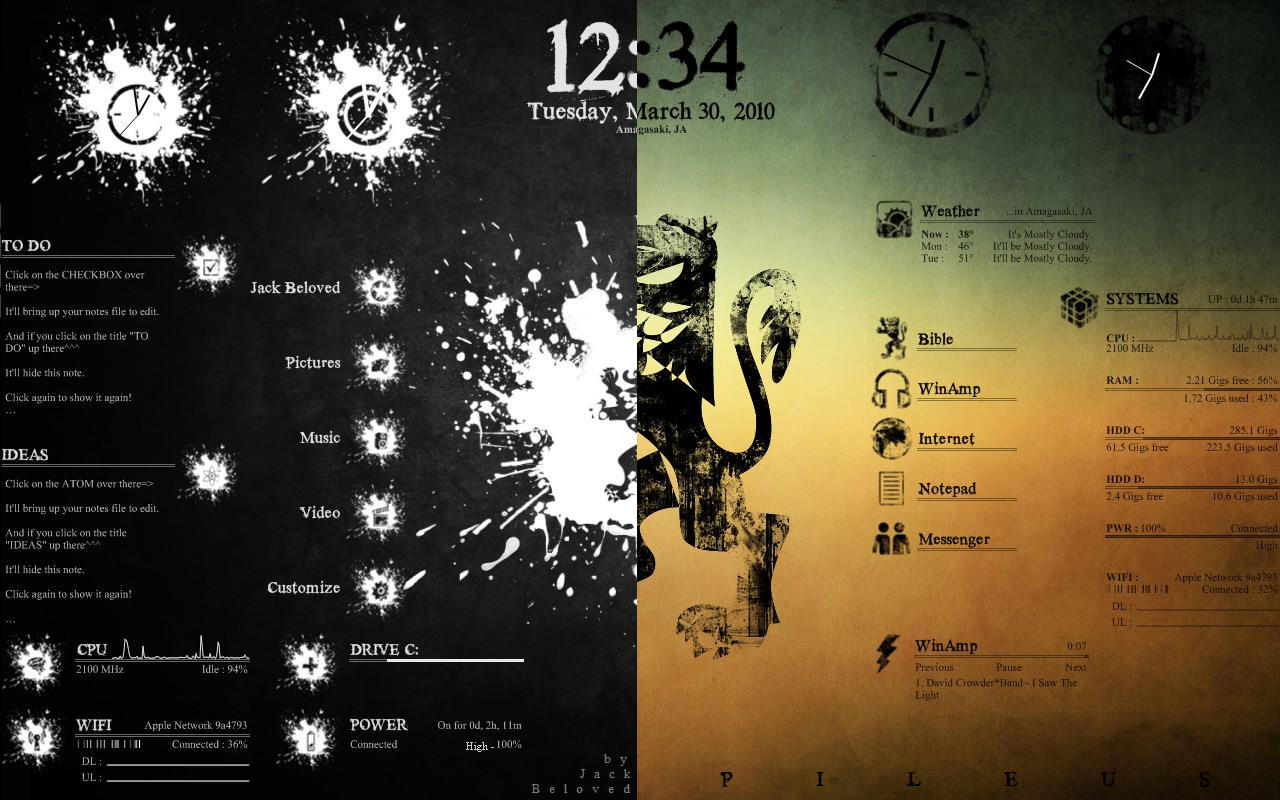
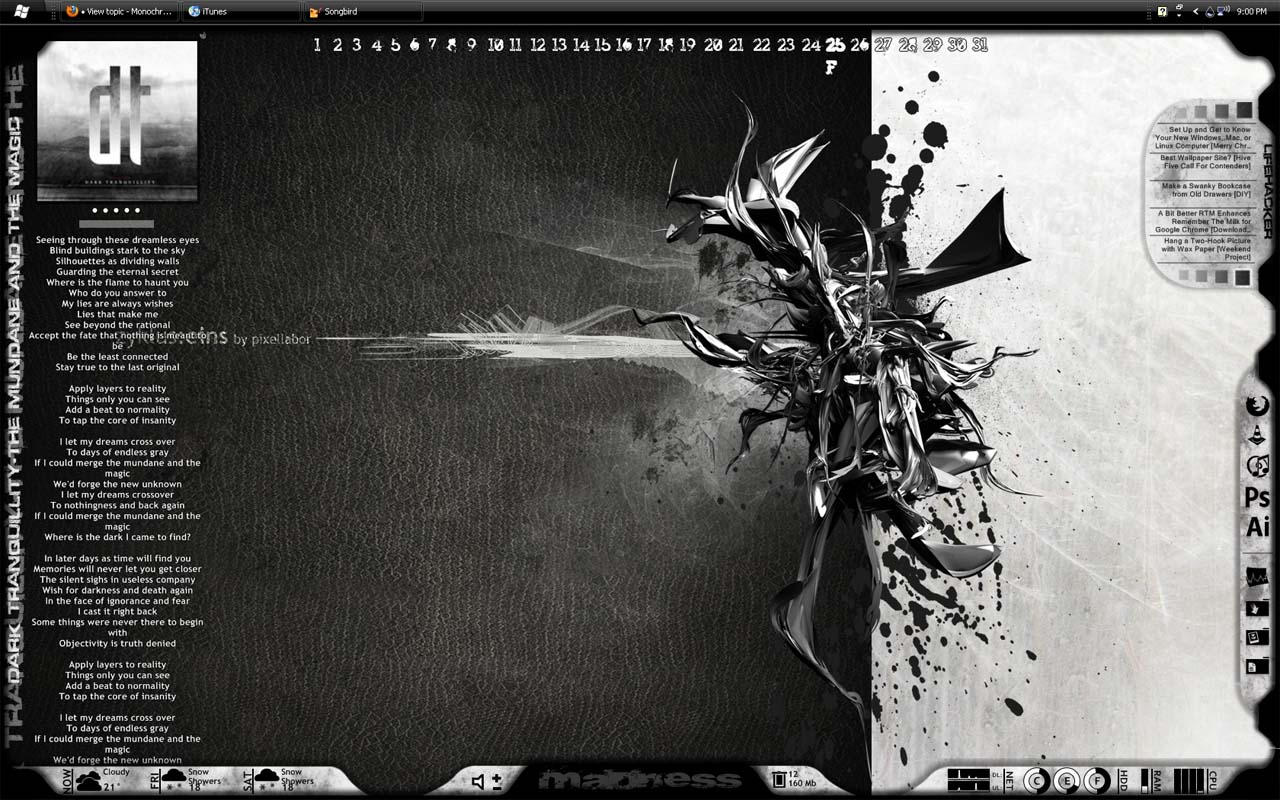
Here are a couple of example of what Rainmeter can do. All the skins are easily customized and parts from different skins can be combined, or you could make your own from scratch which is made easy by allowing the creators to focus on the look by plugging there artwork into functions that are already available.


    Rainmeter is the best known and most popular desktop customization program for Windows. Enhance your Windows computer at home or work with skins; handy, compact applets that float freely on your desktop. Rainmeter skins provide you with useful information at a glance. It's easy to keep an eye on your system resources, like memory and battery power, or your online data streams, including email, RSS feeds, and weather forecasts.

    Many skins are even functional: they can record your notes and to-do lists, launch your favorite applications, control your media player - all in a clean, unobtrusive interface that you can rearrange and customize to your liking.

    There are thousands and thousands of skins available, crafted by a large and ever-growing community of Rainmeter users. !!! WARNING !!! Be careful where you get your skins and plugins, try to only get skins from rainmeter.net and when downloading from deviantart.com make sure the comments aren't disabled on that skin!

    Rainmeter is not just an application, it is a robust toolkit. Create and modify your own skins in a simple language that's easy to learn, with the help of extensive documentation, getting started guide and skin tutorials. Skins call upon measures, a set of powerful built-in modules that do all the heavy lifting, and create interactive meters to display that information however you decide. In this way, Rainmeter brings productive innovation together with creative artistry like no other platform of its kind.

    Over the last few years, a thriving community has built up around Rainmeter, as average users freely contribute their own original skins, their generous knowledge and support, and their inspirational ideas to a project whose scope and capabilities are constantly expanding.

    Rainmeter is designed for YOUR system. Rainmeter uses very little CPU and RAM resources, has a tiny space footprint, and will run perfectly well on any hardware using Windows XP through Windows 8.

    Rainmeter is free and open source. Rainmeter is open source software distributed free of charge under the terms of the GNU GPL v2 license. If you want to get involved, check the Developers page.

Official website http://rainmeter.net/cms
Rainmeter 101 http://rainmeter.net/cms/Rainmeter101
The source code is on Github https://github.com/rainmeter/rainmeter

Music Sites for Digital Artists

    Creating a multimedia piece online is relatively easy now, with the rise of Youtube videos, and sites such as Qik and Animoto, make publishing multimedia content even easier. One of the problems many digital creatives face, is music licensing. If you want to use / share someone else’s music, you have to be careful.

    Regardless if you live for music or make a living off of music we can all enjoy Creative Commons licenses. Creative Commons helps you share your knowledge and creativity with the world.

    Creative Commons develops, supports, and stewards legal and technical infrastructure that maximizes digital creativity, sharing, and innovation. By allowing your work to be available to millions of other creators on the web, you might be responsible for the next big thing.

Here are a couple of artists that use Creative Commons licenses

BradSucks
http://www.bradsucks.net/
Brad Sucks is the name of a one man band. All MP3′s are available for free download and can be mashed up and used in youtube videos / animations etc.

Josh Woodward
http://www.joshwoodward.com/music/
Using the same strategy as Brad Sucks, Josh Woodward offers free albums licensed under Creative Commons.

Nine Inch Nails – Ghosts
http://ghosts.nin.com/

    Those are just a couple of the popular artists using the Creative Commons License, a great place to discover new artists is Jamendo. Linux users should be familiar with this site, as access to it is a feature built in more then one music application by default on the Linux desktop.
Jamendo
http://www.jamendo.com/en/

When browsing for some music to add to your collection go with Creative Commons with help from this list of music sites.

Creative Commons
http://creativecommons.org/audio/

CCMixter
http://ccmixter.org/
ccMixter is a community music site featuring remixes licensed under Creative Commons where you can listen to, sample, mash-up, or interact with music in whatever way you want.

SectionZ
http://www.sectionz.com/cc.asp
An electronic music community that offers Creative Commons-licensed tracks from genres like IDM, drum ‘n’ bass, and ambient.

Audionautix
http://www.audionautix.com/html/free_music.html

FreePD
http://freepd.com/
This site currently has 19 pieces of music dedicated to the Public Domain, contributed by 1 composer.

SoundClick
http://www.soundclick.com/business/license_list.cfm
SoundClick offers a search engine interface to find creative commons mp3′s.

Magnatune
http://www.magnatune.com/

Personally a big fan of the Magnatune approach to music distribution. Their offering allows you to use music in your project, whilst it is being created, then once you create something commercial, you can move to a commercial license.

FreeSound
http://www.freesound.org/ -  Freesound's focus is only on sound, not songs, which separates it from the crowd. They provide collections of sounds as w

Overview

    This is only scratching the surface. There are plenty of brilliant artists out there using creative commons licensing, now at least we have some great sites emerging online to find them. If you offer you music open source, stick a link in the comments for me, and I’ll get you added in here.

Django/Rails-Like Rapid Development for Ubuntu


Glade + Python is about as easy as it gets for doing Linux GUI development.

With Glade you build a XML-file describing a Gnome graphical user interface using a GUI editor.
http://glade.gnome.org/

    The boiler plate code for a Python GTK project would be some stuff like importing the libraries you need, loading the Glade XML file, creating the initial class for your application and then starting up the gtk.main()-style mainloop.

    Once that is done then it's mearly a matter of defining class methods and assigning them to your various buttons.

    This tool works perfect for the novice programmer just about anyone should be able to get from zero to 'hello world' GUI program in about 2 minutes. With full version control, build environment, and the ability to easily create installable packages.

    From there on everyhing from accessing the hdd, remote file systems, dbus for system events, gstreamer transcoding/encoding/decoding, telepathy for integration into online services, and all that happy stuff is just a few edits away.


Installation

$ sudo apt-get install quickly quickly-ubuntu-template

Begin Tutorial

$ quickly tutorial ubuntu-application

Resources

https://wiki.ubuntu.com/Quickly
http://developer.ubuntu.com/resources/tools/quickly/
http://blog.didrocks.fr/post/Quickly-0.4-available-in-lucid!

New To Programming? Learn Python, which is a good choice for learning programming.
http://www.learnpython.org/
http://docs.python.org/tutorial/
http://code.google.com/edu/languages/google-python-class/

Old articles about Quickly
arstechnica.com - quickly-new-rails-like-rapid-development-tools-for-ubuntu -2010
zdnet.com - unchaining-the-opportunistic-programmer - 2009

Cyclos On-Line Banking System

    With the recent crash of the economy in Greece the people have come up with a new cashless Euro-free currency.  Rawstory: Greece develops cashless, Euro-free currency in tight economy

They were able to do this with the help of Open Source Software by a group called STRO (Social TRade Organisations). STRO’s objective is to move money as a major steering mechanism in society from causing environmental abuse and preventing many poor to optimise their capacities, to become an instrument that serves a qualitative human development. The first STRO was founded in 1970 in Holland.


STRO picks up the challenge described by Bank of England’s governor Mervyn King:
“Is it possible that advances in technology will mean that (...) the world may come to resemble a pure exchange economy? Electronic transactions in real time hold out that possibility. There is no reason, in principle, why final settlements could not be carried out by the private sector without the need for clearing through the central bank. (...) There is no conceptual obstacle to the idea that two individuals engaged in a transaction could settle by a transfer of wealth from one electronic account to another in real time. (...) The same system could match demands and supplies of financial assets, determine prices and make settlements. Financial assets and real goods and services would be priced in terms of a unit of account. Final settlement could be made without any recourse to the central bank.(...) Without such a role in settlements, central banks, in their present form, would no longer exist; nor would money.”


http://www.activistpost.com/2012/04/greek-town-develops-bartering-system.html

Visit http://project.cyclos.org/ to check out all the features of this Open Source project.

Speed Dreams

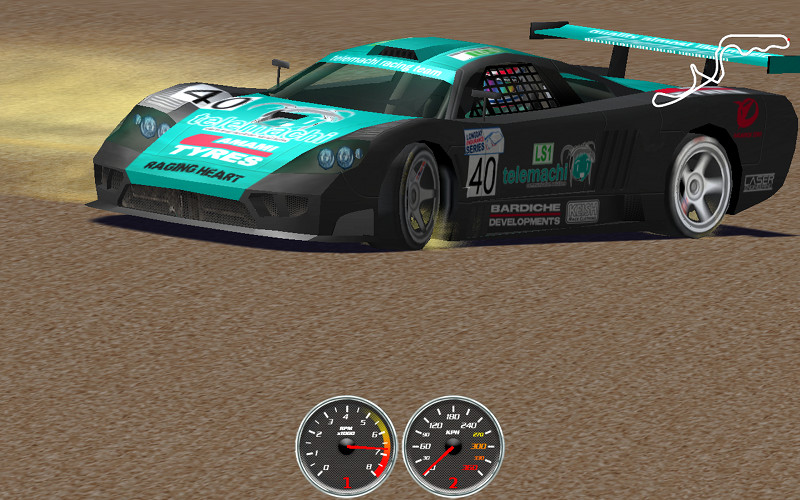
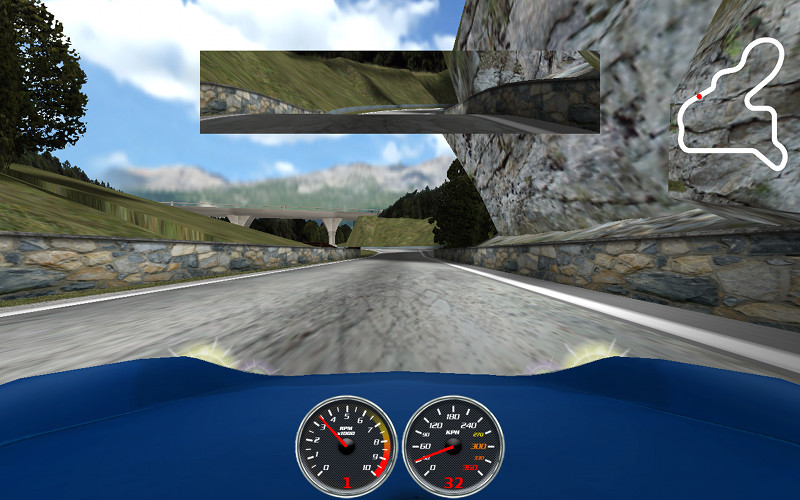
   Speed Dreams is an Open Source motorsport simulation (sim) and it is freely available. Speed-Dreams is brought to you by an international team of developers and artists, who aim to bring the very best of Open Source racing to your PC. Speed-Dreams simulates a wide range of cars from high-tech Open Wheelers and Super Cars, to 1930's 'monsters'. It includes Grand Prix tracks located around the world, as well as Ovals and Road courses.  Am personally a really big fan of rally racing games and am glad to see rally cars and tracks in this game.


Speed-Dreams is available for Windows and Linux, and available for free download from
http://www.speed-dreams.org


    Speed Dreams is a fork of the famous open racing car simulator Torcs, aiming to implement exciting new features, cars, tracks and AI opponents to make a more enjoyable game for the player, as well as constantly improving visual and physics realism.

In other words, Speed Dreams is the place:
  • where developers can try their ideas and have every chance to get them released to the end-users (democracy is the main principle ruling the dev team),
  • where end-users can enjoy the completion of these ideas and give their opinion about it, and/or make new suggestions.

So, if you find your or some people's Torcs patch proposals don't integrate the official release as quickly as you would have loved, you have reached the right place!

Anyone can join the development team, contributions to Speed Dreams may take place in many domains:
  • The core code itself, and its numerous subjects : user interface, physics engine, 3D graphics engine, race management, input device related code, file formats, ... to enhance, optimize, make more up-to-date, fix bugs, port to another platform ...
  • the robot(s) code (AI racing)
  • the cars design or tuning
  • the tracks design
  • the documentation
Current features of Speed-Dreams as of 2.0 beta:
  • 38 tracks
  • 16 tracks with full scenery and terrain
  • 28 cars
  • Animated drivers with some cars
  • 10 camera modes
  • Close to realistic physics
  • Experimental full 3D physics engine (user selectable)
  • Supported input devices: Keyboard, Wheel, Joystick, Mouse, Gamepad
  • Customizable controls
  • Automatic shifting, ABS, ASR
  • 2 completely different AI opponent sets, Simplix and USR

KDE vs Gnome 3 vs Unity

    Even though the terminal is where all the action is at, the GUI is what the majority of users deal with to interact with the PC and makes a big impact on how they use their PC. KDE and Gnome are the default choices most Linux distributions offer, while Unity is only on Ubuntu. A couple lesser known GUIs are XFCE and LXDE which are great for lower end, older systems. For example an install of Linux Mint LXDE on machines with half a gig of ram runs the machines run pretty darn well, and functions in a way that windows converts can handle without blowing their mind during the transition.

    When it comes to my desktop/workstation KDE is the option that I've decided to stick with, while on my laptop I've gone with Ubuntu's Unity. Tried using Gnome 3 with the Mint Gnome Shell Extentions, but just didn't like the interface. The Mint Gnome Shell Extensions provide a familiar feel to a new piece of software. Having two launchers seemed cluttered, not to mention couldn't adjust the properties to either bars. Just wanted them to auto-hide but couldn't tell them to. Also it seemed unorganized how it creates new virtual desktops on the fly, I prefer the four virtual desktops in a 2x2 grid pattern like in Unity. KDE approaches this differently in what is called activities. Instead of switching between virtual desktops the activity is more of a toggle, you set up the desktop the way you like it for a certain task, like video editing then save it as an activity. Then you would just choose the activity that you want to do and all the apps and windows will open. The activities do allot more then just remember what applications are open though, will save that topic for another post though. ( How to use KDE Activities)

 Here is a List of GUIs on the wikipedia, some of them are no longer active though.

    Like the rest of the Open Source desktop environments KDE is much more then a way to use the mouse to click an icon and launch an application, providing file managers, simple tools like a calculator and an interface to change the settings of the PC. KDE goes even further then most, not just with the amount of applications it provides but sheer amount of features and the way they are so perfectly integrated into the system is unrivaled. On top of all the features are the options, there are tons of them and they are easy to find, but not in a way that makes the system feel cluttered. In fact it the is very clean.

    While I like Ubuntu with Unity and the direction their heading, it just isn't the way I interact with a desktop with multiple screens. It's perfect on a laptop though, and will make a nice addition to the market space when Unity appears in televisions and android phones. Unity is also pretty easy to use as Ubuntu has been the Linux system that takes pride in ease of use and setup. Although with ease of use and taking away some of the options and simplifying things users lack the knowledge to fix or work around things that break. On top of that some of the ways that they make the system easier to use feels less safe from a security standpoint. First of all the installations are pretty standard among the install base, and as it becomes more popular it will become a bigger target that'll effect a bigger group, like the users with out of date packages. This shouldn't be a problem as Linux is pretty secure from the ground up, and gets security patches, updates, and bug fixes more often then the competition, but it's up to the user to perform those updates.


This video (not by me) shows the new features of KDE 4.8, but is gets no where near all of the awesome features of KDE. It will provide a good look into the KDE desktop environment though.


This is a video of the Unity interface from Ubuntu. This desktop environment is on its' way to your phone and television, and will be a nice change.


Love Linux Mint, just not a fan of Gnome 3, even with the MGSE (Mint Gnome Shell Extensions) Gnome 3 just wasn't for this user. This is a review of Linux Mint 12 that covers the MGSE (not by me)


What are your thoughts? Leave a comment and share them.

LinuxMCE

    LinuxMCE (Linux Media Center Edition) is a free and open source software platform with a 10-foot user interface designed to allow a computer to act as a home theater PC (HTPC) for the living-room TV, personal video recorder, and home automation system. It allows control of everything in the home, from lighting and climate to surveillance cameras and home security. It also includes a full-featured VoIP-compatible phone system with support for video conferencing. The distribution it runs on is Kubuntu Linux.


MyPaint

    A friend has a laptop that is like a tablet, the screen rotates around and sits on the keyboard. There is pencil like pointing device that is pressure sensitive. First thing that came to mind was PAINTING, and there's an Open Source tool for that. Surprised?

    MyPaint is a fast and easy open-source graphics application for digital painters. It lets you focus on the art instead of the program. You work on your canvas with minimum distractions, bringing up the interface only when you need it. MyPaint runs on GNU/Linux as well as Windows

    Instead of explaining all the cool features and power of MyPaint lets just look at some screenshots and finished paintings.

This is a screenshot of MyPaint running in Ubuntu 11

This screenshot is taken in an older version of Linux
Screenshot of adjusting some brush settings in MyPaint

Another screenshot taken in Linux

Instead of listing the technical aspects of MyPaint let's look at some finished paintings. These are found at deviantart http://mypaint.deviantart.com/gallery/.


    For Windows users MyPaint is available at MyPaint, there are also extra brushes and a gimp plugin for download. There is a tutorial for people who've never used MyPaint, Basic Usage Tutorial. After going through the basic usage tutorial check out the wiki to learn more advanced tricks MyPaint Wiki.

    See MyPaint in action with a timelapse. This was posted in 2009.
Kristen Stewart, portrait in MyPaint approximately 1 hour into lees than 10 min